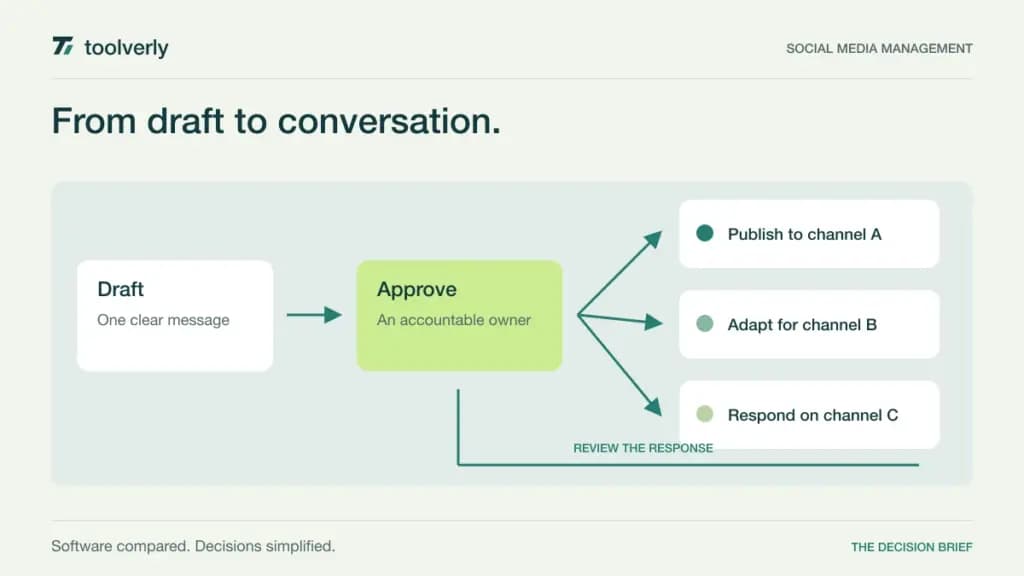
Managing social media becomes a coordination problem before it becomes a publishing problem. A founder can post directly to one account. A team handling several brands must also agree on drafts, approve changes, answer comments, and explain results. The right software makes those responsibilities visible without adding another calendar nobody maintains.
Buffer, Hootsuite, Later, Sprout Social, and SocialPilot approach that work differently. This comparison focuses on recurring business publishing and team coordination. It is based on official product and pricing information checked on September 24, 2026, rather than hands-on performance testing. Dollar amounts below are USD; annual rates are monthly equivalents with an annual commitment, and taxes or regional pricing may change the checkout total.
Define the accounts, people, and decisions
Before comparing subscriptions, list every social profile and the people who draft, approve, publish, and respond. Five brands with two profiles each represent ten connected accounts, even if only one employee manages them. An occasional client reviewer may have different access needs from a full-time publisher.
Separate the publishing calendar from the wider campaign plan. Our project management comparison covers briefs, dependencies, and delivery dates. Here, the decision is how approved content reaches each network and how the team handles the response. If a campaign also includes newsletters, compare the separate consent and audience workflows in our email marketing guide.
| Product | Best fit | Main strength | Meaningful tradeoff |
|---|---|---|---|
| Buffer | Small teams with a clear publishing routine | Channel-based pricing and an accessible queue | Every connected channel contributes to paid-plan cost |
| Hootsuite | Teams combining publishing and engagement | Calendar, inbox, and monitoring in one platform | Seat costs and approval requirements affect the plan |
| Later | Brands planning a coordinated social presence | Profile sets, content scheduling, and link-in-bio tools | Profile grouping and monthly post limits need attention |
| Sprout Social | Teams with substantial engagement and reporting work | Shared inbox and structured social operations | Per-seat costs and premium modules require budgeting |
| SocialPilot | Agencies managing several client accounts | Account bundles and client collaboration options | Client seats begin above the entry team plan |
Buffer
Buffer is a sensible starting point when the team needs a repeatable queue more than a large reporting operation. Drafts, scheduled posts, analytics, and community replies sit around the same publishing routine. Its pricing unit is a connected channel, so the account list is a more useful budgeting input than the number of brands.
Buffer’s current plans show Essentials at $5 per channel per month, billed $60 yearly, with one user. Team is $10 per channel per month, billed $120 yearly, and adds unlimited team members, access levels, and approval workflows. The free plan supports three channels with ten queued posts per channel.
The strength is a clear route from individual publishing to collaboration. The limitation is that adding profiles can expand the bill even when staffing stays constant. Evaluate a real approval: let a contributor draft, request a revision, and return the post to the queue. Buffer fits best when everyone can agree on a straightforward publishing process and a limited set of reporting questions.
Hootsuite
Hootsuite deserves consideration when the social manager must switch between planned content and incoming conversations throughout the day. Its combination of scheduling, an inbox, and monitoring makes that broader operating role central to the purchase. The relevant question is whether those activities share an owner in your organization.
The official plan comparison lists Standard for up to ten social accounts, with unlimited scheduling subject to its terms, a consolidated inbox, and brand and competitor monitoring. The page advertises Standard from $99 per user per month; its comparison uses annual billing. Professional expands account capacity, while Advanced emphasizes approvals and collaboration. Enterprise pricing requires a quote.
The advantage is breadth across the working day. The tradeoff is paying for seats and capabilities that a simple queue may not need. Ask the reviewer and community manager to map their actual responsibilities onto the proposed tier. Hootsuite is a stronger fit when publishing, response handling, and monitoring are established responsibilities with people assigned to use them.
Later
Later organizes its plans around social sets, which can make a brand’s collection of profiles easier to budget. It combines scheduling with analytics and a link-in-bio destination. That is useful when a campaign needs a coherent route from a social post to a product, article, or other destination.
Later’s pricing page shows Starter at $18.75 per month billed yearly: one user, one social set of eight profiles, and thirty scheduled posts per profile per month. Growth is $37.50 per month billed yearly, with two social sets, two users, higher post allowances, and internal and external collaboration and approvals. A social set has a defined platform mix; it is not eight interchangeable accounts.
The strength is organizing a brand’s output across supported networks. The limitation is that publishing volume and profile composition can force an upgrade independently of team size. Use next month’s actual calendar to count posts, including campaign variations. Later fits teams whose profile mix aligns with its sets and whose content workflow benefits from its planning and destination tools.
Sprout Social
Sprout Social is worth evaluating when the work continues after a post goes live. A busy social team may spend more time classifying and responding to messages than arranging a queue. In that setting, ownership and reporting can matter more than the cheapest publishing subscription.
The official pricing page lists Essentials at $99 per seat per month when billed monthly. Standard includes five social profiles, a consolidated inbox, collaboration tools, monitoring, and review management. Professional expands to unlimited profiles. Premium Analytics and Listening are separate add-ons available from Standard upward; do not assume that a general analytics label includes those modules.
The strength is support for a more organized social operation. The limitation is the total cost of all working seats and any specialist modules. Have the reporting owner reproduce a useful monthly report during evaluation, including the explanations they normally add by hand. Sprout is most compelling when a team can connect those operational capabilities to an existing workload and a specific reporting audience.
SocialPilot
SocialPilot’s account bundles are relevant for agencies that need to manage several clients without treating every profile as a separate procurement decision. Its plan structure makes the distinction between internal collaborators and client participants particularly important.
SocialPilot lists Essentials at $25.50 per month billed annually for seven social accounts and one user. Standard is $42.50 per month billed annually for fifteen accounts and three users. Premium is $85 per month billed annually for twenty-five accounts and six users, with unlimited client seats. Enterprise includes custom arrangements and sales-led pricing.
The advantage is a visible progression as an agency adds accounts and collaborators. The tradeoff is that a team needing client participation may require Premium even before it fills the account allowance. Test one client’s complete approval cycle, including a rejected draft and a late change. SocialPilot suits agencies that can map their client roster, internal team, and review process to the bundle without relying on shared logins.
Run a publishing cycle that includes mistakes
A polished calendar demo does not reveal how a team recovers from a changed brief. Build a small evaluation around content you would actually publish, using test accounts or drafts where appropriate. Include an image post, a short video, a link, and a platform-specific variation. Confirm which formats publish automatically and which require a notification or a final step in the network’s own app.
Next, introduce a revision after approval. Observe whether the reviewer sees what changed and whether the scheduled time remains clear. Disconnecting an account during normal work can also disrupt a queue, so inspect the product’s reauthorization messages and decide who owns that task. These are evaluation scenarios, not claims that we ran such tests.
Finally, follow a comment through to a useful reply. Decide whether a customer question stays with the social team or moves to support. A central inbox only helps if someone owns the handoff and can find the context later. Measure the number of manual steps in that process alongside the subscription price.
Choose around the weekly workload
- Count connected profiles, regular users, occasional reviewers, and external clients separately.
- Check the exact post formats and account types your team uses.
- Price required approval, inbox, reporting, and listening capabilities on the same billing term.
- Confirm what happens when a client leaves or a profile must be replaced.
- Export a report and a sample content record before committing to a long contract.
Start with Buffer for a focused queue, Later for a brand workflow that matches its social sets, and SocialPilot for account bundles with agency collaboration. Put Hootsuite and Sprout on the shortlist when responding, monitoring, and reporting occupy a substantial part of the team’s week. The strongest choice is the one that gives each recurring task a clear owner at a cost the team can explain.
Original illustration by Toolverly. Read about our publication or send a correction.