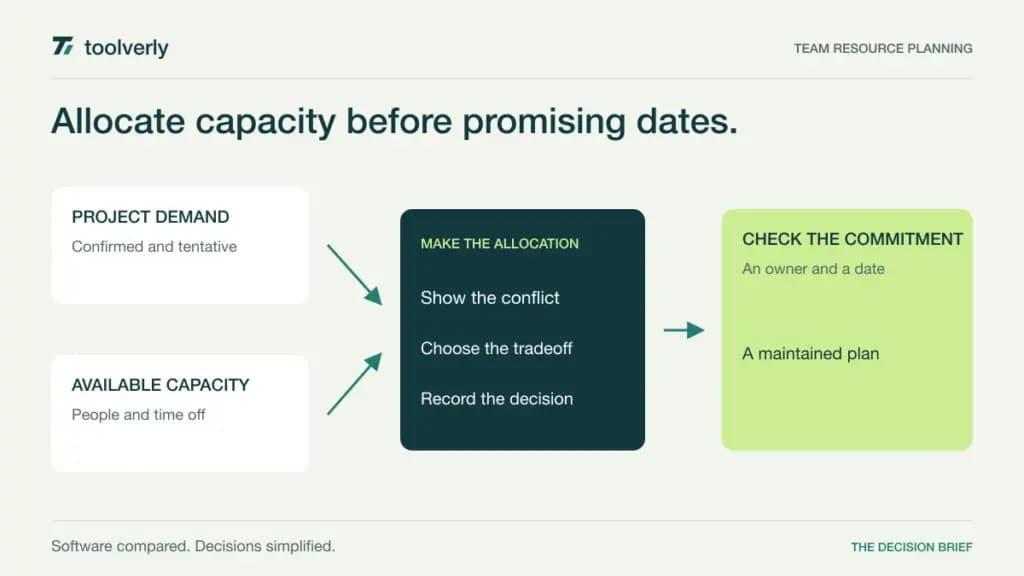
A team can have enough people in total and still miss a project because the necessary specialist is already committed. Resource planning software makes those future commitments visible. It connects project demand to working capacity, time off, tentative work, and the choices managers must make when dates move.
This comparison examines Float, Runn, Resource Guru, Teamdeck, and Harvest Forecast using official information checked on October 9, 2026. It does not claim hands-on testing or measured productivity improvements. The relevant decision is where the allocation plan should live and who will keep it credible.
Separate that plan from the task list. Project management software organizes delivery work, while a resource schedule asks whether the right person has room to do it. Time tracking software records what actually happened. Connecting these views can improve planning, but importing every small task can also obscure the capacity decision.
Begin with your scheduling unit: hours, days, or a percentage of availability. Define how internal work and sales opportunities consume capacity. Give tentative commitments an explicit meaning so the same person is not promised to several clients merely because those projects have not started.
Five approaches to team capacity
| Product | Best fit | Main strength | Meaningful tradeoff |
|---|---|---|---|
| Float | Professional services allocation | Capacity and delivery views | Scheduled people determine cost |
| Runn | Demand and project financial planning | Tentative work and scenarios | Advanced workflow needs higher scope |
| Resource Guru | People and shared resource booking | Scheduling with clash management | Reporting needs a higher tier |
| Teamdeck | Allocation alongside timesheets | Different member access types | Light members lack full application access |
| Harvest Forecast | Focused project scheduling | Capacity linked to Harvest actuals | Harvest is billed separately |
Float
Float centers the plan on scheduled people, capacity, time off, and project allocation. Its Starter tier covers resource scheduling and project scoping. Pro adds time tracking, rate cards, cost estimation, and broader reporting. That makes it a candidate for services teams that want to connect delivery commitments to the financial view of a project.
The strength is treating resourcing as a maintained operating process rather than an occasional spreadsheet. The limitation is assuming a reporting feature or permission exists because it appears somewhere in the comparison. The current page labels customized access and permissions as coming soon; future functionality should not become a purchasing dependency.
Pricing is per scheduled person, rather than just the managers editing the calendar. Starter and Pro display USD rates of $8.50 and $14 per person per month in the checked monthly view; enterprise arrangements require discussion. Best fit: a team willing to keep availability and allocations current. During evaluation, move a project’s start date and inspect what happens to the people it shares with other work.
Runn
Runn brings together project scheduling, tentative projects, capacity and utilization views, and project financial information. Lite provides core planning; Standard adds timesheets, custom fields, integrations, and saved scenarios. Advanced expands the workflow further, including resource requests. This is useful when sales uncertainty and staffing demand belong in the same planning discussion.
The strength is examining the effect of possible work before turning every opportunity into a confirmed booking. The limitation is that scenario planning requires agreed assumptions. A visually plausible future schedule is not evidence that the work is sold, the estimate is reliable, or a person has the necessary skills.
The monthly pricing view lists Lite at $7 and Standard at $11 per resource seat in USD; annual billing is also available. It also identifies volume discounts from 100 seats and custom Advanced pricing. Confirm the rate with the selected billing toggle and proposed resource count rather than treating a calculator’s default total as your quote. Best fit: teams needing a capacity forecast across confirmed and tentative projects. Ask how placeholders become real assignments without leaving duplicate demand.
Resource Guru
Resource Guru can schedule people and other resources, which matters when delivery depends on equipment or shared facilities as well as staff. Its published feature comparison includes booking controls, time off, calendar synchronization, and clash management. The plan structure distinguishes core scheduling from reporting and broader administration.
Its strength is a booking model that can represent more than a list of employees. The tradeoff is buying the entry tier and then discovering that reports are essential to the operating review. Grasshopper is described as the essentials without reports; Blackbelt adds reporting and timesheets. Evaluate approval and clash behavior in the tier you will actually purchase.
The monthly pricing view lists Grasshopper at $6 and Blackbelt at $9.60 per person in USD, with other resources priced separately; annual subscriptions are also available. Use both counts when calculating the cost; a piece of equipment is not necessarily billed like a person. The provider states that partially used subscriptions are not refunded. Best fit: teams coordinating scarce people and shared resources through a clear booking process. Rehearse a conflicting request and confirm who can approve the final allocation.
Teamdeck
Teamdeck combines resource scheduling, time tracking, and absence management. Its member types affect who can access and operate the system. Full members have broader application access, while light members can appear in planning and reports and use selected mobile and notification functions without full application access.
The strength is keeping the planned and recorded use of time close together. The limitation is assuming the cheaper member type can do the same work as a manager or scheduler. Create a role map before estimating seats: someone who only supplies time information may have different needs from someone changing bookings, creating reports, or resolving conflicting allocations.
The checked monthly calculator shows $6 per full member and $2 per light member. Annual payment is advertised with a 10% saving; enterprise onboarding and custom requirements are priced by proposal. Best fit: organizations wanting allocation and timesheets with intentionally different access levels. Ask a light member to complete the exact reporting routine you expect, then verify whether an administrator must intervene.
Harvest Forecast
Harvest Forecast is a focused team scheduling product that can connect to Harvest’s time records. It visualizes team capacity, supports shifting assignments and timelines, and provides exports. The connection is useful when a services business already records actual hours in Harvest and wants future commitments to inform project reviews.
The strength is a relatively direct allocation workflow. The tradeoff is expecting the schedule to replace a complete project or finance system. Establish what remains in Harvest and what Forecast owns. A change to an estimate should have an identifiable author and should not quietly rewrite the explanation of previously tracked work.
Forecast lists $6.25 per person per month on monthly billing, or $5 per person per month billed annually, in USD. Both scheduling managers and scheduled people count, including people not invited to sign in. Harvest and Forecast are billed separately. Best fit: teams needing a focused capacity schedule, especially alongside Harvest. Include all necessary people in the cost model, not only the few managers who edit bookings.
Choose the plan your managers will maintain
Start with a representative month. Include two overlapping projects, internal work, an absence, a part-time colleague, and a tentative opportunity. Write down the assumptions before importing anything. Otherwise, a trial can look tidy simply because it contains fewer constraints than the real business.
Make one project slip by a week. The useful question is which commitment must now change and who can authorize that change. Check whether the view makes over-allocation visible, preserves the distinction between tentative and confirmed work, and lets a manager explain the decision to the affected person.
Then compare plan and actual time without treating every difference as a performance problem. Estimates, scope changes, and missing time entries can produce similar-looking variances. A resource tool should help investigate the difference; it should not create a false precision around an incomplete input.
Calculate licensing from the entire scheduled population, resources, viewers, and required administrator roles. Some products charge for the people represented in the schedule even if those people never log in. Add integrations and implementation effort to the evaluation rather than assuming a low per-seat rate settles the decision.
- Define the scheduling unit and standard working capacity.
- Mark tentative demand and its decision owner.
- Rehearse a conflict, absence, and date shift.
- Confirm the report and approval tier.
- Set a routine for updating availability and assumptions.
Shortlist Float for services allocation tied to delivery, Runn for tentative demand and scenarios, Resource Guru for mixed resources, Teamdeck for allocation with differentiated timesheet access, and Harvest Forecast for focused scheduling connected to an existing Harvest process.
Official sources and verification date
Checked October 9, 2026: Float plans, Runn pricing, Resource Guru plans, Teamdeck member types, Harvest Forecast product, Forecast seat rules, and Forecast subscription rates.
Original illustration by Toolverly. Read about our publication or send a correction.