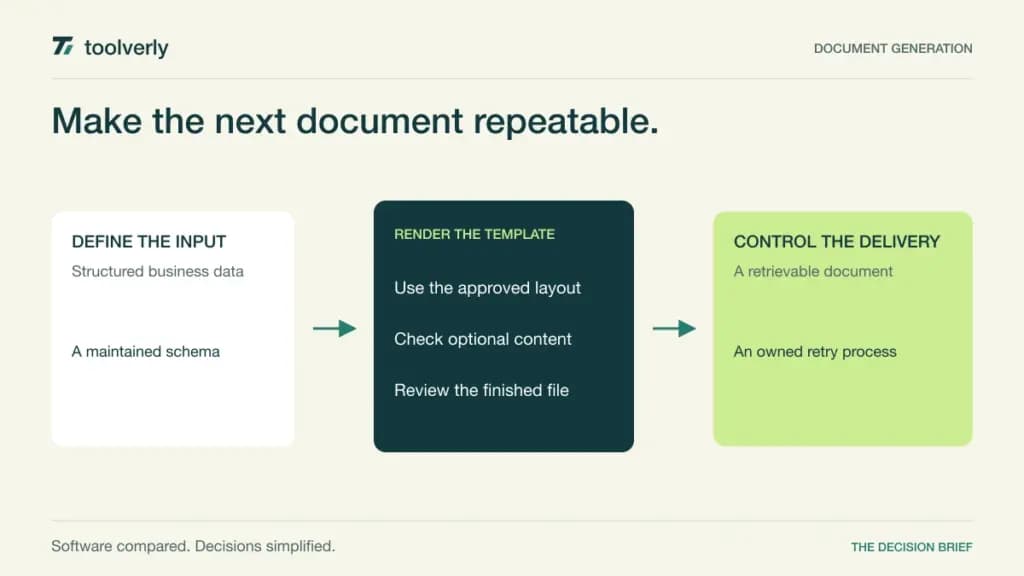
A recurring business document often begins as structured data: customer details, order lines, inspection results or a reporting period. Manually copying that information into a file creates work every time the data or template changes. Document generation software connects a maintained template to those inputs and produces a repeatable output with an identifiable delivery path.
Plumsail Documents, Docupilot, Documint, Carbone and PDFMonkey approach that process with different template tools, formats and integrations. The right choice depends on who maintains the layout, where the data originates, and whether the output must be a PDF, an editable Office document or both.
Official sources were checked on October 12, 2026. This comparison evaluates documented capabilities and pricing, not measured rendering accuracy or speed. Generating a file does not prove its financial calculations are correct, that it is legally approved or that delivery succeeded. Those responsibilities need to remain visible in your workflow.
Compare the input, the template and the finished file
| Product | Best fit | Main strength | Meaningful tradeoff |
|---|---|---|---|
| Plumsail Documents | Connected business automation | Templates integrated with process and delivery steps | Process runs and actions consume document allowance |
| Docupilot | Office and PDF template workflows | Multiple template formats and integrations | Delivered-document quotas and signature add-ons differ |
| Documint | Visually maintained PDF templates | Business data connected to document design | Annual allowances and optional packs need planning |
| Carbone | API-driven multi-format reporting | Office templates and deployment choices | Usage units and hosting responsibility vary |
| PDFMonkey | Application-generated PDFs | HTML-based templates and a focused API | Retention, rendering limits and overages depend on plan |
Plumsail Documents
Plumsail Documents connects template-based document creation with business automation and delivery. Its product offering covers document templates, conversion and integrations, making it useful when the generated file is one step in a larger workflow rather than the only outcome.
The advantage is connecting the document to existing automation responsibilities. A team can evaluate the template, its data source and where the file goes next together. The limitation is usage accounting: a process run, an integration action execution or a REST API call counts as one document under the pricing explanation. Do not assume every business case consumes only one unit.
Best fit: teams maintaining business documents within connected processes, especially when the integration owner needs a defined generation and delivery path. Demonstrate a failed delivery and a rerun as well as a successful file.
Price context: the live USD store displays Folder, Drawer and Cabinet with 200, 1,000 and 3,500 monthly documents, respectively. Monthly and annual choices are available, with SLA inclusion differing by plan. Confirm the chosen billing toggle and reserve-document price in checkout; the static retrieval did not reliably expose those amounts, so we omit a universal starting fee.
Docupilot
Docupilot supports Word, Excel, PowerPoint and PDF templates, a document builder, API access and integrations such as Zapier, Make and Airtable. Its pricing centers on generated documents delivered, with seats and electronic signature delivery addressed separately. This helps buyers distinguish producing a document from the optional signing step.
The advantage is using familiar template formats while connecting them to business data. The limitation is that layouts still need disciplined maintenance. A template that works for one line item may fail with a long list, missing fields or a different locale; those are evaluation cases, not problems the pricing page can answer.
Best fit: teams wanting reusable Office or PDF templates with several integration paths. Ask a business editor to update a field and demonstrate how the automation uses the intended version.
Price context: Starter lists $29 per month for 100 delivered documents and one included seat; higher plans increase allowances. Additional seats list $4 per seat per month. Signature envelopes are a separately priced add-on. Invoice billing on Business and Enterprise requires a yearly commitment. Confirm limit handling and the precise signature volume price before combining those services.
Documint
Documint focuses on generating documents from business data through maintained templates and integrations. Its interface provides a visual design approach, dynamic content and API access, with common uses including reports, invoices and other repeatable PDFs. This is relevant when a business team needs to own the layout without building a rendering application from scratch.
The advantage is connecting document design to the data that populates it. The tradeoff is output and deployment scope: confirm the formats you require and whether the hosted operating model fits your workflow. A visual editor still needs representative sample data and a clear owner for conditional content.
Best fit: teams producing recurring PDFs from structured operational records. Include an empty field, a long address and a multi-page table in the evaluation, then ask the editor to make a safe template correction.
Price context: the annual view shows Silver at $39 per month billed annually, with 2,400 documents per year and five signature envelopes per month. Gold and Platinum provide larger allowances, with additional packs available. Annual plans make merges and envelopes available upfront according to the FAQ. Confirm annual versus monthly quotas rather than treating the monthly equivalent as a month-to-month subscription.
Carbone
Carbone renders templates using structured data, with familiar Office formats among its template and output choices. Its pricing distinguishes Cloud, On-Premises and Private Cloud. The API-oriented model is useful when document generation needs to sit within an application or reporting service while template authors continue working in familiar tools.
The advantage is connecting multi-format rendering with a choice of operating architecture. The tradeoff is technical ownership and licensing scope. A self-operated deployment needs infrastructure and maintenance; a cloud plan still has limits for documents, templates and parallel rendering.
Best fit: development teams producing repeated reports or business files from structured records. Ask for a demonstration of a complex repeating table, locale-sensitive numbers and the exact output format your users need.
Price context: the live euro Cloud view shows Essential at €29 per month with 1,000 documents and Advanced at €159 with 20,000. Annual equivalents differ. A document unit is based on injected JSON and image data size: a render exceeding the stated one-megabyte unit can consume multiple documents. Overages, concurrency, deployment licensing and taxes need separate review; one generated file is not always one billed unit.
PDFMonkey
PDFMonkey provides an API for producing PDFs from maintained templates, with HTML, CSS and dynamic data as the design foundation. Its pricing distinguishes quotas, execution limits, team access, external assets and retention. It is a focused option when the application needs a generated PDF rather than a complete Office document workflow.
The advantage is a direct API-to-PDF production model. The limitation is that someone must maintain the template and understand how its assets and styles render. The plan also determines how long generated documents remain available; delivery should not rely on a temporary vendor URL remaining valid indefinitely.
Best fit: application teams that want controlled PDF generation and can own the template and delivery code. Evaluate fonts, page breaks, missing assets and a failed generation callback alongside the normal document.
Price context: Starter is €5 per month billed monthly for 300 documents, or €4.50 per month billed annually, excluding VAT and taxes. Free provides 20 monthly documents. Paid plans can enable per-document overages; Starter’s rate is €0.008. Overages and Boost Packs are mutually exclusive options. Retention and render-time limits vary by plan.
Use documents that expose the maintenance work
Choose a representative document set instead of a single attractive invoice. Include a short record, a long table, optional sections, multiple currencies, different date formats and missing data. If editable Office output is required, inspect that output separately from its PDF conversion. A visually acceptable PDF does not establish that the source file is useful to the next person.
Define who maintains the template and who changes the input schema. Record an explicit version or approval process so a field rename does not silently produce an incomplete document. Decide where the finished file lives, how a failed generation is reported, and whether reruns create duplicates or replace an intended draft.
Our workflow automation comparison covers the orchestration around document production. Our business PDF editor comparison addresses correcting finished documents. Document generation should reduce repeated manual preparation while preserving a controlled path for necessary corrections.
Estimate normal and peak monthly volume, test and rerun usage, optional signing and retained files. Add template implementation and maintenance to the subscription comparison. The cheapest unit price can be misleading when one process runs several billable actions or a large payload consumes several units.
- Confirm required templates, outputs and rendering dependencies.
- Test long tables, optional fields and locale variations.
- Name owners for template and input schema changes.
- Trace storage, delivery, retries and duplicate handling.
- Compare allowances, overages, retention and annual commitments.
Shortlist Plumsail Documents for connected processes, Docupilot for familiar multi-format templates, Documint for visually maintained PDFs, Carbone for API-driven multi-format rendering, and PDFMonkey for focused application PDFs. Choose the workflow that produces a correct, retrievable document after the next data and template change.
Official sources checked October 12, 2026
Plumsail Documents store; Plumsail Documents features; Docupilot pricing; Documint pricing; Documint product; Carbone plans; PDFMonkey pricing and limits.
Original illustration by Toolverly. Read about our publication or send a correction.