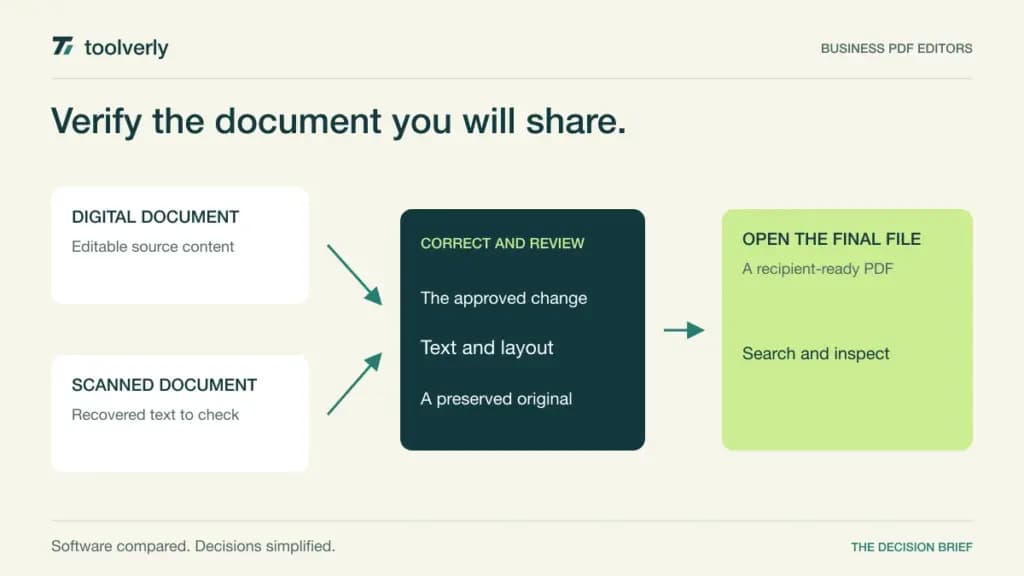
A PDF is often treated as the finished document, until someone needs to correct a table, recover text from a scan or remove information before sharing it. At that point, a viewer is not enough. A business PDF editor should help the team make a controlled change while preserving a document that recipients can open, search and understand.
Adobe Acrobat, ABBYY FineReader PDF, Nitro PDF, Foxit PDF Editor, and PDF-XChange Editor address different parts of that work. Their differences include scanned-document handling, comparison tools, operating-system coverage, administration and license duration. The right choice starts with the documents employees receive, not an empty sample PDF.
Official sources were checked October 8, 2026. This is a feature and licensing comparison with editorial selection guidance, not a hands-on OCR benchmark. Collecting signatures is a separate buying decision covered in our electronic signature comparison. Define where the approved final file belongs through your business file-sharing process.
Five PDF editing choices compared
| Product | Best fit | Main strength | Meaningful tradeoff |
|---|---|---|---|
| Adobe Acrobat | Teams with varied PDF workflows | Broad editing, conversion and document tools | Standard, Pro and Studio have different entitlements |
| ABBYY FineReader PDF | Teams working heavily with scans | OCR-centered document conversion and comparison | Mac and Windows products have different scope |
| Nitro PDF | Teams selecting managed PDF licenses | Editing with clear subscription and term choices | Classic is a three-year Windows license |
| Foxit PDF Editor | Teams combining desktop and web work | Editing, OCR and version comparison | Mobile and advanced extras depend on package |
| PDF-XChange Editor | Windows teams preferring perpetual licenses | Detailed editing tools and an optional maintenance model | Plus features and deployment needs require review |
Adobe Acrobat
Acrobat offers a broad PDF workflow across desktop, online and mobile access. The current plan material separates Standard’s editing, organizing and conversion tools from Pro’s additional scanned-document conversion, comparison and redaction capabilities. That separation is useful when deciding which employees only adjust ordinary PDFs and which routinely handle scans or sensitive content.
Studio adds AI Assistant, PDF Spaces and Adobe Express Premium on top of Pro. These are additional workflow choices, rather than a requirement for basic editing. Decide whether the team needs them before using Studio as the default license for every person. A subscription should match the employee’s actual task.
Best fit: organizations with varied PDF jobs and established Adobe administration. Limitation: plan names, individual versus team licensing, regional pricing and commitment terms complicate a simple dollar comparison. The checked plans page provides current feature distinctions, but stable business checkout prices were not available in this review; confirm the relevant regional business offer. In a pilot, compare a corrected file with its original, reopen the output in a separate viewer and inspect both visible text and search results. Acrobat’s current plan distinctions.
ABBYY FineReader PDF
FineReader PDF is particularly relevant when incoming documents are scanned pages rather than neatly generated digital files. Its Windows product combines PDF work with OCR, while Corporate adds document comparison and automated conversion through Hot Folder. That makes it a candidate for a team repeatedly converting scans into searchable documents or editable office files.
The checked regional store display lists Standard at EUR99 per year or EUR16 per month, and Corporate at EUR165 per year or EUR24 per month for one standalone license. Three-year subscriptions are also offered. Corporate’s stated 5,000-page monthly allowance applies to automated Hot Folder processing, not every manual document action. Volume and alternative license types require a separate offer.
Best fit: departments with substantial scanned-document work. Limitation: the Mac product emphasizes OCR conversion and is not the same full editing package as Windows Standard or Corporate. Confirm platform scope before assigning licenses. Evaluate documents with your actual languages, tables, annotations and scan quality; inspect the recovered text and exported structure manually. A vendor’s accuracy description is not a measured result on your files. FineReader pricing, platforms and automation limits.
Nitro PDF
Nitro’s current offers distinguish PDF Standard, PDF Plus and PDF Classic. Standard provides document creation, conversion, editing and annotation with team management through its administration portal. Plus adds enterprise capabilities such as single sign-on, domain controls and usage analytics. That can suit a business wanting a managed PDF operation rather than individual installations purchased independently.
The fresh rendered pricing page lists Standard at USD15 per user per month, USD180 billed annually, with tax calculated at checkout. Plus requires a quote. Classic is displayed at USD270 per license billed once for three years of Windows use. It is not described as a perpetual license, and should not be presented as lifetime access. PDF and signing products also have separate commercial scope.
Best fit: teams choosing between centrally managed subscriptions and a defined Windows desktop term. Limitation: platform coverage and enterprise entitlements need to match the selected offer. Ask IT to demonstrate assignment and removal of a license, and ask an employee to correct, combine and export a real document. Keep specialist redaction or automation products separate unless the proposed contract explicitly includes them. Nitro’s current license choices.
Foxit PDF Editor
Foxit PDF Editor’s current package combines desktop and web work with text and page editing, office-format conversion, OCR and comparison. The plan page also describes document management features such as version history and check-in/check-out. Those features deserve attention when a team needs to know which file is being edited and which version can be distributed.
The fresh local display showed PDF Editor at RSD15,227 per user per year and PDF Editor+ at RSD18,741 with the annual-paid-in-full option. These are regional Serbian-dinar displays, not converted USD list prices. The alternative is an annual plan billed monthly; that wording still describes an annual commitment. Confirm checkout taxes, currency and renewal terms.
Best fit: teams combining desktop and web PDF tasks. Limitation: mobile editing and advanced extras are package-dependent. Editor+ adds mobile applications, Smart Redact and a stated signing allowance; organizations seeking 30 or more licenses can request volume terms, including separately available perpetual options. Test the base editing workflow before paying for additional document services. Check how a file moves between desktop and web without losing the approved version. Foxit’s current plans and regional pricing.
PDF-XChange Editor
PDF-XChange Editor is worth shortlisting for a Windows-based team that wants a detailed desktop tool and a perpetual license model. The vendor distinguishes Editor from Editor Plus. Plus adds enhanced OCR, document comparison and further form-related capabilities. Make that distinction explicit when a department’s main requirement is scan conversion or creating fillable documents.
The current volume pricing chart lists a single-user Editor license at USD62 and Editor Plus at USD79. It describes licenses as perpetual, with optional maintenance providing access to later releases and updates. Volume packs have their own prices; a single-user headline should not be multiplied blindly when pack terms apply.
Best fit: Windows teams preferring a desktop purchase with separately managed update coverage. Limitation: operating-system fit, Plus entitlements and maintenance expectations need review. The vendor offers many free capabilities, but a usable business rollout still requires checking which tasks need a paid license. Ask IT to establish an update policy, then inspect the exact version used to create and reopen a completed document. Editor and Plus product scope and license and volume pricing.
Use a document set that exposes the difficult work
Prepare a small, authorized set of representative files: a digitally generated report, a skewed scan, a document containing a table, and a file that requires an approved correction. Remove unnecessary confidential material before a vendor demonstration. The exercise should reflect your task while keeping document access under the organization’s existing policy.
Separate visual inspection from text inspection. A scan can look correct while the OCR text contains errors; a conversion can preserve words while losing a table’s relationships. Check search, copied text, page breaks and exported office files. If the workflow includes redaction, verify the final saved output with the responsible reviewer rather than assuming a visible black box proves removal.
Keep administration in the decision. Confirm supported operating systems, license assignment, update delivery and whether processing happens locally or through an online service. Ask how subscription changes affect access and which version rights survive a term ending. Compare total cost over the same period, including maintenance, optional products and the people who administer the rollout.
- List editing, OCR, comparison and form tasks separately.
- Identify Windows, Mac, web and mobile requirements.
- Inspect the final PDF in a recipient’s expected viewer.
- Distinguish perpetual rights, fixed terms and annual subscriptions.
- Define the approved original, edited copy and final distribution record.
Start with Acrobat for a broad PDF workflow, FineReader for scan-heavy document work, Nitro for managed subscriptions or a defined desktop term, Foxit for combined desktop and web editing, or PDF-XChange for Windows and perpetual licensing. Choose on the quality of the corrected document and the clarity of the license you will actually buy.
Original illustration by Toolverly. Read about our publication or send a correction.