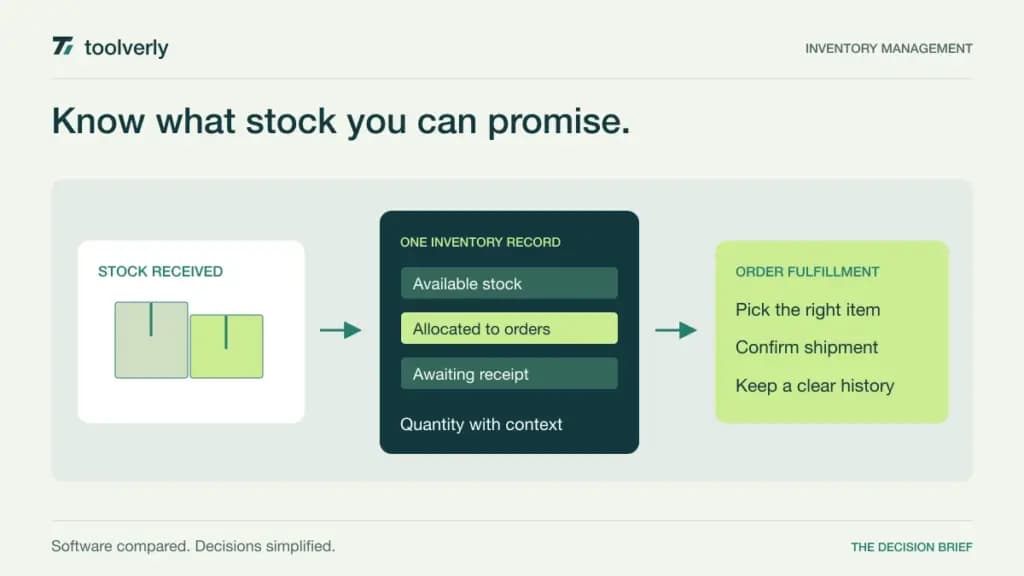
Inventory software should help the team answer a practical question: what stock can we confidently promise, and what must happen before it is available? That requires more than a quantity field. Receipts, sales orders, transfers, corrections, and purchasing decisions all need to describe the same physical goods consistently.
We compared Cin7, Zoho Inventory, inFlow, Sortly, and Katana using official product and pricing pages checked on September 30, 2026. The recommendations are editorial judgments about workflow and buying fit, not results from a warehouse trial. Prices retain their displayed currencies and billing conditions. Hardware, implementation, taxes, and additional modules may sit outside the headline subscription.
This article focuses on goods and stock operations. Our IT asset management guide covers a different problem: tracking organizational equipment and responsibility for it. A business selling replacement parts needs a different workflow from a business recording which employee has a laptop.
Five ways to organize stock operations
| Product | Useful starting point | Verified price example | Important capacity boundary |
|---|---|---|---|
| Cin7 | Connected purchasing and sales operations | Core Standard: $349/month displayed | Five users and 6,000 sales orders/year |
| Zoho Inventory | Smaller order-driven businesses | Standard: €29/organization/month, billed annually | 500 orders/month, two users, two locations |
| inFlow | Stock and orders across locations | Small Business: $349/month, billed annually | Five team members and 12,000 orders/year |
| Sortly | Visual item organization and scanning | Ultra: $888 for the first annual term | Promotional rate; 2,000 unique items and five users |
| Katana | Inventory with optional production modules | Core starts at $299/month | Usage-based cost; one included location |
These allowances are not interchangeable. An annual order cap, a monthly order cap, a unique-item limit, and a location allowance describe different constraints. Build a twelve-month operating scenario before asking which package is cheaper, including the busiest season and any planned warehouse expansion.
Cin7
Cin7 Core Standard is displayed at $349 monthly in USD, excluding taxes. It includes five users, two ecommerce or app integrations, 6,000 sales orders per year, and unlimited inventory locations. Pro is $599 with ten users, four integrations, and 24,000 annual sales orders. Cin7 also offers a separately quoted Omni product. The reviewed price cards show monthly amounts; confirm the contract and payment schedule in the proposal.
Strength: Core is worth investigating when purchasing, stock, sales, and connected channels need a coordinated system. The explicit order and integration allowances make the operational footprint part of the buying discussion.
Limitation: modules and services such as API access, B2B portals, POS, or implementation can require additional scope. Unlimited locations do not mean unlimited everything. Best fit: an organization with enough operational complexity to justify mapping its channels and responsibilities before rollout. Ask the vendor to demonstrate an order whose stock arrives in two separate deliveries. Review Cin7’s Core and Omni pricing with the exact modules written into the quote.
Zoho Inventory
The reviewed European pricing lists Standard at €29 per organization monthly, billed annually. It includes 500 orders per month, two users, and two locations, with features such as composite items, backordering, dropshipping, and a customer portal. Professional is €79 annually billed, with 3,000 monthly orders, two users, four locations, and serial-number or batch tracking. Local taxes and additional capacity charges are separate.
Strength: the organization-based package provides a concrete starting scope for a smaller business. A buyer can connect the plan to order volume and the number of people who actually operate the system.
Limitation: more orders do not necessarily bring more included users; Professional still lists two. If several people receive, pick, supervise, and reconcile stock, price their access explicitly. Best fit: a business with a manageable order flow that wants purchasing and stock records connected to sales work. Include returns, a backorder, and a partial shipment in the trial rather than testing only a clean sale. Check Zoho Inventory’s current regional limits.
inFlow
inFlow’s Small Business plan is $349 monthly with annual billing, including five team members, 12,000 sales orders per year, three integrations, and unlimited inventory locations. Entrepreneur is $129 annually billed, with two members, 1,200 annual orders, one integration, and one location without sublocations. Additional sales orders are listed at $0.20 each. Separate Stockroom and Manufacturing offerings should not be treated as identical to the inventory package.
Strength: Small Business gives a five-person operations team a defined combination of order capacity and location coverage. It is a useful candidate when stock movement and order handling both matter.
Limitation: the lower plan’s location and integration limits can matter before its order allowance is exhausted. Confirm which connected systems count toward the integration total and whether the workflow needs a different product. Best fit: a business willing to map receiving, storage, picking, and shipment as one process. Ask two employees to work on related tasks during the demonstration so that handoffs are visible. Use inFlow’s current inventory pricing page for the applicable order and team allowances.
Sortly
Sortly emphasizes visual item organization, barcode or QR scanning, and stock visibility. Its reviewed annual promotion lists Ultra at $74 monthly equivalent, charged as $888 for the first year, with 2,000 unique items and five users. Ultra includes barcode and QR label features and purchase orders. The promotion is for eligible new subscriptions; Sortly says promotional plans renew at the standard rate when the introductory period ends.
Strength: visual records and scanning are worth evaluating when employees identify stock by appearance and location as much as by formal product codes. The first test can be a real receiving or stock-check task.
Limitation: the attractive first-year amount is not a guaranteed renewal quote, and unique items are a different capacity measure from total unit quantities or sales orders. Confirm the definition for your catalog. Best fit: a team prioritizing clear item organization and day-to-day stock visibility. Verify that the selected plan’s purchasing and reporting scope is sufficient before assuming it replaces a wider order-management system. Review Sortly’s pricing and promotional conditions.
Katana
Katana Core starts at $299 monthly, with unlimited SKUs and users and one included location. Its current model varies with delivered sales orders, additional locations, and selected add-ons. Manufacturing, traceability, and warehouse management are separate paid modules. Monthly billing reflects actual usage; annual pricing locks in an estimate with a premium for usage variation, according to the pricing FAQ.
Strength: the modular model lets a growing goods business discuss inventory operations and production requirements together. It can be useful when the buyer knows which manufacturing or traceability steps are actually needed.
Limitation: the Core starting amount is not a complete manufacturing-system quote. Additional modules, locations, order volume, and onboarding scope must be priced. The FAQ also describes revisiting annual plans when usage exceeds the estimate by more than 20%. Best fit: a business prepared to model operational usage and specify its production workflow. Ask for a worked quote covering both a normal month and the busiest month, with each add-on named. Consult Katana’s current pricing and billing FAQ.
Use stock movements as your acceptance test
Choose a small sample catalog that represents your real complexity: a simple item, a variant, a bundle, a returned item, and anything requiring a batch or serial reference. Define units of measure and naming conventions before importing it. Otherwise, the trial may merely reproduce an inconsistent spreadsheet in a more expensive interface.
Walk through receiving less than the supplier promised, moving stock to another location, allocating it to an order, and correcting a mistaken quantity. At each step, ask what the next employee sees and which record explains the change. A useful system makes the history understandable to someone who was not present when the work happened.
Then test connected systems. Determine which application owns product details, available quantity, sales orders, and accounting records. If you add a custom business application around the process, keep those responsibilities explicit. A second editable quantity field can create uncertainty even when both interfaces look polished.
Finally, compare twelve-month cost and implementation effort using the same assumptions for every vendor. Include user access, busiest-period orders, locations, required modules, scanning equipment, and training. Select the product that supports the actual stock journey and can be maintained by the team responsible for it, rather than the one with the longest feature list.
Original illustration by Toolverly. Read about our publication or send a correction.