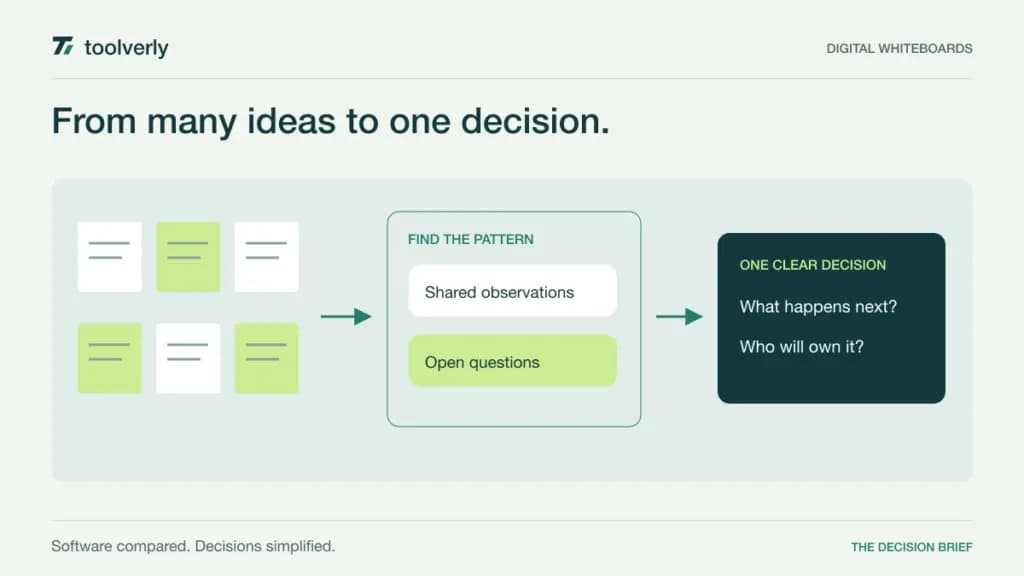
A digital whiteboard earns its place when it helps a group move from individual observations to a shared decision. Sticky notes are easy to create. The harder work is guiding participants, keeping different ideas distinguishable, and leaving a result that someone can use after the workshop ends.
Miro, Mural, FigJam, Lucidspark, and Whimsical approach that problem from different directions. Some emphasize facilitation and large shared workspaces; others fit product design or structured diagrams. This comparison uses official product and pricing information checked on September 25, 2026. It is a documentation-based buying guide, not a claim that we measured the products in live workshops. Dollar prices below are USD and identify the billing basis.
Choose the board around the session
Describe one session you run regularly. A customer journey workshop needs a place for observations and evidence. An architecture discussion needs connections and labels. A retrospective needs participation rules and an agreed follow-up. These activities can share a canvas while requiring very different facilitation tools.
Separate your permanent editors from occasional participants. A public visitor link, a registered guest, and an internal editor are different access arrangements. Decide which one suits a client workshop before comparing seat prices. Finally, name the destination for the outcome: tasks in project management software, or a maintained explanation in a team wiki. A board can preserve the discussion without becoming the only record of the decision.
| Product | Best fit | Main strength | Key tradeoff |
|---|---|---|---|
| Miro | Broad cross-team workshops | Many canvas formats and integrations | Guest access differs by tier |
| Mural | Facilitated group sessions | Tools for guiding participation | Visitor and guest roles differ |
| FigJam | Teams working around design | Collaboration within Figma | Choose the correct seat type |
| Lucidspark | Ideation alongside diagramming | Facilitation and Lucid ecosystem | Broader suite scope changes the purchase |
| Whimsical | Product flows and concise diagrams | Focused visual structure | Free creation limits are significant |
Miro
Miro combines a whiteboard with formats such as tables, documents, slides, and Kanban on the canvas. Its Starter tier includes private boards, visitor editing, high-resolution exports, and facilitation tools such as timing and voting. That range makes it a candidate when different departments need one shared environment for workshops and visual planning.
The current pricing page lists Starter at US$8 per member per month, billed yearly. Business is US$20 on that basis and adds unlimited registered guests and workspaces, among other capabilities. Free permits three editable boards. Starter’s public visitor editing and Business’s signed-in guest collaboration should not be treated as interchangeable access models.
Miro’s breadth is its strength, but it also increases the number of ways a team can organize the same work. Establish a small set of templates and an owner for each workspace. In a trial, ask a participant who missed the session to find the final decision without a guided tour. Miro fits a team that wants a flexible common canvas and is prepared to set conventions for it. Buy the guest arrangement you actually need, rather than choosing solely on the editor price.
Mural
Mural puts facilitated collaboration at the center of its offering. Its pricing documentation lists tools for bringing the group to a location, timing activities, protecting board content from accidental movement, and guiding participants. For someone running workshops rather than simply drawing diagrams, those controls are a meaningful part of the product.
The official plans list Team+ at US$9.99 per member per month billed annually, or US$12 monthly. Team+ provides unlimited editable murals and editing visitors. Business is US$17.99 per member per month billed annually and adds registered guest collaboration and SSO. Free supports three editable murals, with visitors limited to viewing.
The distinction between visitors and guests matters for repeat client work. One-time access to a board is different from ongoing access to a room containing several projects. Decide what participants should see when they return next month. Mural is a strong candidate for facilitators who want deliberate control over a session. Its limitation is organizational rather than merely financial: a well-equipped board still needs a clear agenda. Test a timed activity, the transition to voting, and the way results are captured before expanding the rollout.
FigJam
FigJam is Figma’s collaborative whiteboard. The product supports group activities such as voting, comments, and audio conversations, while sharing an environment with design work. It belongs on the shortlist when product managers, designers, and other contributors already discuss interfaces and user flows together. The benefit is continuity between exploratory discussion and the design material people regularly reference.
On Figma’s pricing page, a Professional Collab seat is listed at US$3 per month with annual billing. Collab includes FigJam access and viewing and commenting in Figma Design; it is not a full design-editing license. The page also provides free viewer access and higher Organization and Enterprise plans with different administration arrangements.
That seat distinction can prevent unnecessary spending, but it requires an owner who understands who needs to edit what. Ask a regular workshop participant to open both a board and a linked design file with the intended license. Check that the permissions match the job. FigJam fits teams whose visual discussions sit close to design work. If most sessions involve external clients with different access expectations, evaluate that guest journey explicitly rather than assuming an existing Figma subscription settles the decision.
Lucidspark
Lucidspark supports freeform ideation with drawing, comments, grouping, and visual activities. Its Team plan adds voting, timers, guest collaborators, and facilitator tools. Lucid also offers Lucidchart for more formal diagramming, and the Enterprise suite combines the products. That relationship is useful when a workshop’s rough process map needs to become a maintained system diagram.
The rendered Lucidspark pricing page lists Individual at US$9 per month billed annually, and Team at US$10 per user per month billed annually. Free allows three editable boards. Enterprise requires a sales quote. The official plan guide distinguishes the individual products from the broader suite.
The buying trap is comparing a standalone whiteboard license with a bundle without checking what you already own. List the people who need brainstorming, formal diagramming, or both. For evaluation, start with an untidy set of observations, group them, and produce a clear flow. Then check how colleagues revisit and revise it. Lucidspark is a good fit when ideation and structured visual documentation are adjacent responsibilities, provided the chosen package gives each person the right editing access.
Whimsical
Whimsical combines visual boards and documents, with an emphasis on product thinking, flows, and related explanations. Its product overview presents flowcharts, wireframes, and mind maps as core uses. That makes it a useful candidate for a product manager or small team that wants to explain how something works without building an elaborate workshop environment.
The pricing page shows Pro at US$10 per editor per month on annual billing and Business at US$20. Viewers are free. The free tier limits creation to 50 board objects and 50 document blocks per month, with watermarked exports and seven days of version history. Pro removes the creation caps and extends history to 90 days.
Those limits make the free tier more useful for evaluating the workflow than for assuming an unlimited production workspace. Build a real flow with decision branches and explanatory text, then estimate how quickly your team creates objects. Whimsical fits concise product and process communication. If you regularly facilitate large sessions, list the specific participation controls you need and test them separately. A focused visual editor can be the right purchase even when a different product has a longer feature list.
Make the trial end with a usable decision
Prepare the same small activity in two shortlisted tools. Include a short introduction, an individual contribution step, grouping, a decision, and named follow-up work. Invite one participant who rarely uses whiteboards. Observe whether they can navigate, add an idea, and return to the relevant area without constant assistance. These are evaluation steps to run with your team, not results we claim to have measured.
Test recovery as well as creation. Move an object accidentally, restore a previous state, remove a guest, and open the exported result. Check whether the export is readable without zooming through a giant image. Give every board a title, owner, session date, and visible decision area so that people can tell a working draft from a finished workshop.
Choose Miro for a broad shared canvas, Mural for deliberate facilitation, FigJam for collaboration around design, Lucidspark for work that continues into structured diagrams, or Whimsical for focused flows and product explanations. Keep the selection tied to a recurring session and its output. Paying for a more capable board is worthwhile when it removes a real obstacle to participation or follow-through.
Original illustration by Toolverly. Read about our publication or send a correction.