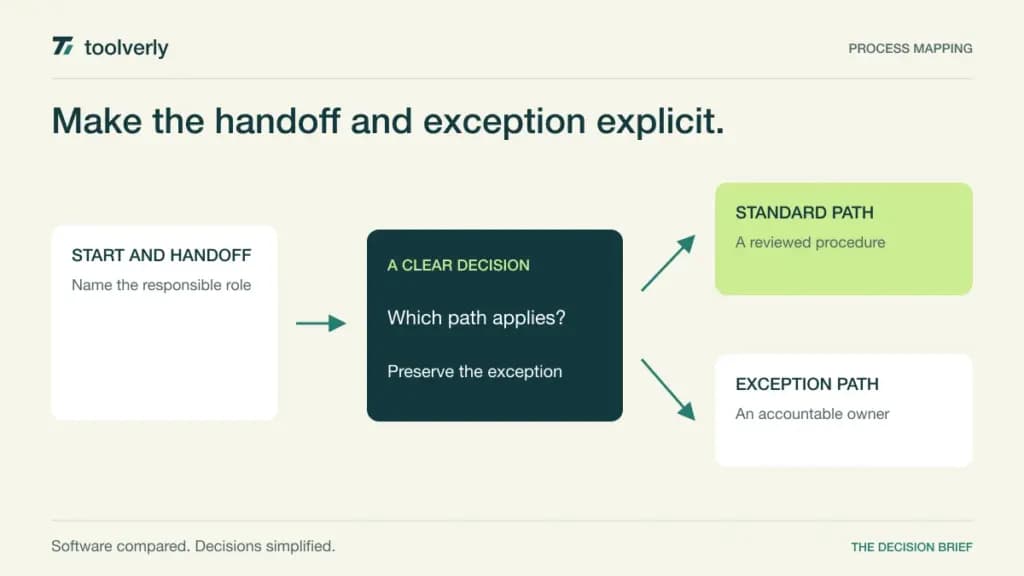
A process map should help the next person understand who does what, which decision changes the path, and where an exception goes. A beautiful flowchart with an obsolete owner can be more confusing than a plain maintained one. Business process mapping software ranges from flexible diagram editors to structured modeling repositories, so the right choice depends on how the organization reviews and reuses its maps.
This comparison covers Lucidchart, Microsoft Visio, draw.io, Bizagi Modeler, and SAP Signavio Process Modeler. The decision is documenting and maintaining process structure. It differs from facilitating an open workshop with a digital whiteboard or actually connecting applications through a workflow automation platform.
Official product and pricing materials were checked on October 6, 2026. We did not benchmark modeling speed or claim a process improvement outcome. Some products support broader automation or transformation suites, but drawing a process does not itself deploy it. Separate the model, its approval, and any eventual execution system in your purchase decision.
Five process mapping approaches
| Product | Best fit | Main strength | Meaningful tradeoff | Pricing reference |
|---|---|---|---|---|
| Lucidchart | Collaborative business diagrams | Shared editing, publishing, and version history | Repository governance needs the appropriate tier | Free; Individual $9/month and Team $10/user/month, annual billing |
| Microsoft Visio | Microsoft-centered diagram workflows | Web collaboration and advanced desktop modeling | Basic included Visio is not full Plan 2 | Plan 1 $5 and Plan 2 $15/user/month, paid yearly |
| draw.io | Teams wanting editable files and storage choice | Free core editor with portable diagrams | Review and publishing discipline remain organizational work | Free core editor; assess integration costs separately |
| Bizagi Modeler | Structured process modeling | Process diagrams, documentation, and simulation | Broader collaboration and automation are separate scope | Free Modeler; broader platform proposal |
| SAP Signavio Process Modeler | Managed enterprise process landscapes | Repository context, variants, and modeling conventions | Transformation platform needs implementation ownership | Request configured commercial scope |
Lucidchart
Lucidchart is a general diagramming environment with templates, shape libraries, collaboration, and publishing features. Its current pricing page gives Team revision history with versioning and password-protected publishing, while Enterprise adds document status and enforceable sharing restrictions. These distinctions matter when a process diagram will remain a maintained operating reference after the initial workshop.
The strength is helping business participants contribute to a shared diagram and discuss it in the context of their existing tools. Team lists integrations with Microsoft 365, Confluence, and Jira. It suits groups that need understandable diagrams and feedback without first establishing a specialist process-modeling program.
The current annual prices are $9 USD/month for Individual and $10 USD per user/month for Team. Free is limited to three editable documents and 75 shapes per document. Enterprise is quoted. The limitation is assuming a shared canvas automatically supplies process ownership, approval rules, and a controlled repository. Define those practices and confirm the tier for sharing restrictions or document lifecycle requirements. Premium diagram access should not be confused with a dedicated process governance implementation.
Microsoft Visio
Visio separates the lightweight version included in Microsoft 365 commercial plans from paid Plan 1 and Plan 2. The included version supports basic diagrams and web collaboration. Plan 1 expands web and Teams diagramming, including cross-functional flowcharts, layers, and shape data. Plan 2 adds the desktop application and advanced process diagrams supporting BPMN 2.0.
Its strength is a recognizable diagram workflow for an organization already managing Microsoft licenses and document collaboration. It suits teams that have existing Visio files or need the more advanced desktop environment. For process mapping, compare a basic responsibility flowchart with a formal model; those may justify different licenses for different authors.
The current US page lists Plan 1 at $5 and Plan 2 at $15 per user/month, paid yearly under automatically renewing annual subscriptions. Plan 2 includes offline and local-file support in the desktop application. The key limitation is entitlement confusion: a Microsoft 365 subscription does not imply every advanced Visio feature. Confirm the exact license, author devices, file exchange requirements, and what reviewers can do through the web before standardizing a template.
draw.io
draw.io offers a free core diagram editor, online use with chosen storage, and a desktop app for local work. Its current site emphasizes editable files, collaboration, and exports such as SVG, PNG, and PDF. It is a practical option when the organization wants the diagram artifact to remain in an existing document or repository workflow.
The strength is file ownership and a low entry cost. It suits teams that can agree on a naming convention, diagram style, and review process without requiring a central specialist platform to enforce them. A useful evaluation is whether someone can open the editable diagram months later, identify its approved version, and make a change without reconstructing a screenshot.
The core editor is advertised as free, with Apache 2.0 licensed source. Treat integrations as a separate purchasing question rather than assuming every marketplace deployment is covered by that core price. The limitation is organizational structure: storage permissions, approved publication, change reviews, and owner reminders still need a maintained home. Saving an editable file in a shared folder supplies portability; it does not by itself establish which version employees should follow.
Bizagi Modeler
Bizagi’s current Modeler page distinguishes Free Modeler from its broader process automation offering. Free Modeler lists process mapping, publishing diagrams as PDF, Word, Excel, web, or SharePoint output, importing formats including Visio and BPMN, and process simulation. This is relevant when the team wants a structured model and accompanying documentation rather than just an image of boxes.
The strength is focusing attention on the process as a model with inputs and paths that can be examined. It suits analysts who need to describe a current state, explore an alternative, and present the assumptions behind it. Simulation can support a scenario discussion, but its output depends on the arrival rates, durations, resources, and other assumptions supplied.
The official page labels the basic Modeler free. It describes collaboration in a customizable process library and broader automation capabilities under the separate platform scope. Do not assume free desktop modeling includes the full shared enterprise repository or a production execution subscription. Request the exact collaboration and automation proposal when needed. The limitation is moving from an individual model to a maintained organizational process library without clarifying ownership, publication rights, and the commercial boundary.
SAP Signavio Process Modeler
The former Process Manager product route now redirects to SAP Signavio Process Modeler. Its current product page describes process collaboration, BPMN 2.0 and value-chain modeling, modeling conventions, and real-time syntax guidance. It also presents variant management for relating and maintaining different versions of an organizational process.
The strength is treating maps as a process landscape rather than isolated documents. It suits process owners and transformation teams that need common definitions, relationships, and reusable structures across departments. For an enterprise with regional or business-unit variants, demonstrate how a shared change is reviewed and how someone finds the correct local process.
The reviewed page directs buyers to a personalized meeting and does not establish a complete public seat price. Request a proposal for authors, consuming audiences, collaboration access, repository scope, support, and any related SAP transformation products. Integration with a wider transformation environment should be evaluated against the organization’s actual operating responsibilities. The limitation is the effort required to maintain conventions and ownership at scale; a sophisticated repository still needs people accountable for content quality.
Select the map’s lifecycle before the editor
Begin with a process that crosses two teams and has a real exception. Record its start and end, accountable owner, handoffs, decisions, and the evidence that a step is complete. Agree whether a plain flowchart is enough or whether a formal notation is required. Adding notation without a reader need can make a simple operating reference harder to use.
Then test the lifecycle: create, review, approve, publish, revise, and retire. Ask a colleague who did not attend the modeling session to find the current map and explain where an exception goes. Check the editable export and the published view, including links to supporting procedures. A process diagram needs a scheduled review and a visible owner just as much as it needs correct connectors.
Lucidchart fits accessible collaboration; Visio existing Microsoft diagram workflows; draw.io file-centered simplicity; Bizagi structured modeling and simulation; and SAP Signavio a managed enterprise landscape. Choose the level of structure the team can maintain. Keep execution-system changes separately approved, and measure usefulness through clearer handoffs and fewer unanswered questions rather than the number of diagrams created.
Official sources
- Lucidchart current plan comparison
- Visio subscriptions and feature scope
- draw.io core editor and storage options
- Bizagi Free Modeler and platform boundary
- SAP Signavio Process Modeler
Original illustration by Toolverly. Read about our publication or send a correction.