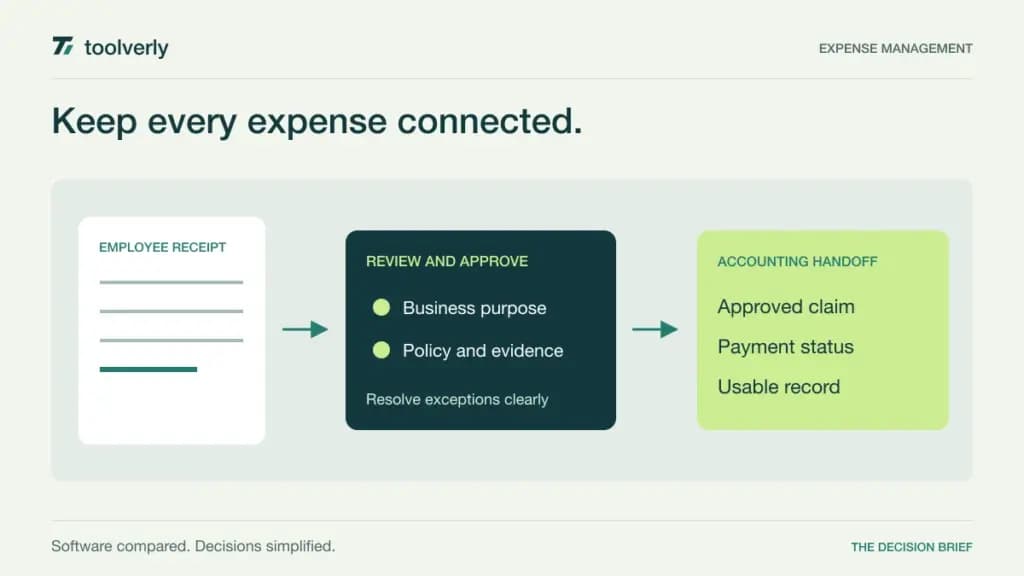
An expense claim is more than a receipt photograph. Someone must identify the business purpose, apply the right approval, decide how the employee is repaid, and hand a usable record to accounting. Expense software is most valuable when it keeps those steps connected without asking employees to become experts in the finance team’s internal process.
We reviewed Expensify, Zoho Expense, Rydoo, Pleo, and Sage Expense Management using official information checked on September 30, 2026. This comparison focuses on operational workflow and purchasing fit. It does not report a hands-on trial, give tax advice, or assume that a product’s payment features are available in every country. USD, EUR, and GBP prices below are the currencies shown on the reviewed pages.
For organizations billing client work, our time tracking comparison covers recording hours. Expense management addresses a different evidence trail: money spent, supporting documentation, approval, and accounting treatment defined by your own team.
Compare the complete expense workflow
| Product | Useful starting point | Verified price example | Important condition |
|---|---|---|---|
| Expensify | Receipts and team expense coordination | Collect: $5/member/month | Control pricing has additional conditions |
| Zoho Expense | Policy-led expense administration | Standard: €3/user/month, billed annually | Five-user minimum |
| Rydoo | Approvals, reconciliation, and per diem workflows | Pro: €10/user/month, billed annually | Five-user minimum; monthly option differs |
| Pleo | Cards and employee reimbursements together | Build: £14/user/month, billed annually | Three-user minimum and reimbursement fee |
| Sage Expense Management | Expenses around existing company cards | Growth: $11.99/active user/month, billed annually | Five-user minimum and defined activity rules |
A low per-user figure can conceal the wrong unit. Compare purchased members with active users, and separate subscription cost from payment, foreign-exchange, integration, or implementation charges. Ask for a quote using your employee population and countries rather than multiplying a homepage number by the number of receipts.
Expensify
Expensify lists Collect at $5 per member monthly. Its package includes receipt scanning, reimbursements, corporate card management, expense and travel approvals, and connections to QuickBooks and Xero. Control has custom pricing advertised as low as $9 per active user monthly under qualifying conditions involving annual commitment and the Expensify Card. Control adds more extensive approval, policy, and enterprise integration capabilities.
Strength: Collect gives a small team a broad starting workflow that connects employee submission with the administrator’s review. The useful evaluation is whether a claimant and approver can resolve a missing detail in one coherent process.
Limitation: the lowest Control number is not an unconditional rate for every organization or billing arrangement. Request the price that applies to your intended card usage and contract. Best fit: a team seeking a shared expense workspace, particularly when its accounting connection is supported in the selected package. Have accounting review an exported transaction before employees start submitting real claims. Check the current Expensify plan comparison for your actual configuration.
Zoho Expense
The reviewed European pricing lists Standard at €3 per user monthly and Premium at €5, both billed annually and excluding local taxes. Each requires at least five user licenses. Standard includes expense policies, corporate card management, delegation, and cash advances. Premium adds capabilities for more advanced approvals and travel administration. A free edition supports three users, but it should be evaluated against its own feature limits.
Strength: a team can examine policy and approval needs before paying for a broader package. Delegation is especially relevant when an assistant prepares claims while another person remains responsible for the expense.
Limitation: regional reimbursements and some connections or add-ons need separate confirmation. Five paid seats are the minimum even if only two employees submit expenses during a quiet month. Best fit: organizations that want a structured process and can name the approval rules they need. Include a delegated claim, a cash advance, and a rejected item in the demonstration. Review Zoho Expense’s pricing and minimum-user FAQ rather than assuming that all Zoho products use the same billing model.
Rydoo
Rydoo Pro costs €10 per user monthly with annual billing, or €12 with monthly billing, with a minimum of five users. It includes capabilities such as per diems, accounting integrations, reconciliation, custom rules, and multilevel approvals. Essentials starts at €8 annually billed or €10 monthly, also with five users minimum, and has a simpler approval scope.
Strength: the published distinction between simple and multilevel approvals helps a buyer connect the subscription to the organization’s actual decision chain. A team can evaluate how a routine claim differs from one needing a second review.
Limitation: Rydoo’s active-user billing language belongs to its quoted Business and Enterprise offers; it should not automatically be applied to the entry plans. Those higher offers also have their own minimums. Best fit: an organization with clearly defined expense rules and several approval responsibilities. Ask an approver to handle an exception while the usual manager is absent, then follow the record through accounting reconciliation. Confirm plan scope and billing in Rydoo’s current pricing table.
Pleo
Pleo’s reviewed UK pricing lists Build at £14 per user monthly, billed annually, with a three-user minimum. Build combines cards, spending controls, approvals, mileage, and employee reimbursements. The lower Start plan costs £8 per user monthly but does not include out-of-pocket reimbursements, so it is not an equivalent starting point for this comparison. Build lists a separate 0.90% direct reimbursement fee.
Strength: a business that wants card spending and personally paid expenses in the same operational process can evaluate both together. This may help an administrator see why an employee paid personally rather than using a company card.
Limitation: subscription price alone is incomplete. Payment-related charges, country availability, and card eligibility need confirmation for the specific business. Best fit: an eligible organization that wants coordinated spending administration and understands its reimbursement volume. Model an ordinary month and a month with substantial employee-paid travel to expose the fee difference. This is a workflow comparison, not a recommendation to take credit. Use Pleo’s regional pricing and fee table.
Sage Expense Management
Formerly Fyle, Sage Expense Management lists Growth at $11.99 per active user monthly, billed annually, with a five-user minimum. Business is $14.99 with a ten-user minimum and broader approval and multi-organization features. An active user is someone with at least one expense or a connected corporate card with a transaction during the month. Growth includes receipt collection, policy handling, a single approval level, and QuickBooks Online or Xero integration.
Strength: the product is worth examining when the organization wants to work with its existing company cards rather than making a new card program the center of the rollout. Receipt collection and transaction reconciliation are central evaluation tasks.
Limitation: connected-card activity can make a person billable even without a manually submitted expense. Confirm issuer support, implementation requirements, and any additional integration fees. Best fit: a finance team that can name its cards, accounting system, and approval structure before the demonstration. Follow one missing receipt from reminder to resolved transaction. See Sage Expense Management’s current pricing.
Make the trial represent a real expense cycle
Start with a small set of fictional claims: a straightforward receipt, a missing receipt, a mixed personal and business purchase, a foreign-currency item, and a duplicate submission. Have the employee, manager, and accounting reviewer each complete their part. Record where the process needs explanation instead of treating a successful receipt scan as a complete evaluation.
Next, test exceptions. A manager is on leave, a project has closed, a claim exceeds a policy threshold, or an employee needs to correct an approved item. Determine who may make the change, whether the reviewer sees what changed, and how accounting learns about the correction. Your internal policy should define the desired behavior before a vendor demonstrates it.
Validate the last step with accounting: fields, attachments, categories, project references, and reconciliation identifiers. A polished employee interface cannot compensate for an export that requires extensive rework every month. If you connect surrounding steps with a workflow automation platform, give failures an owner and avoid creating a second, inconsistent approval history.
Choose the product that handles the common path clearly and the exceptions predictably. Compare the annual subscription, minimum seats, activity definition, payment charges, and implementation effort using one consistent scenario. Then roll out a documented process that employees can follow without guessing how finance wants a claim prepared.
Original illustration by Toolverly. Read about our publication or send a correction.