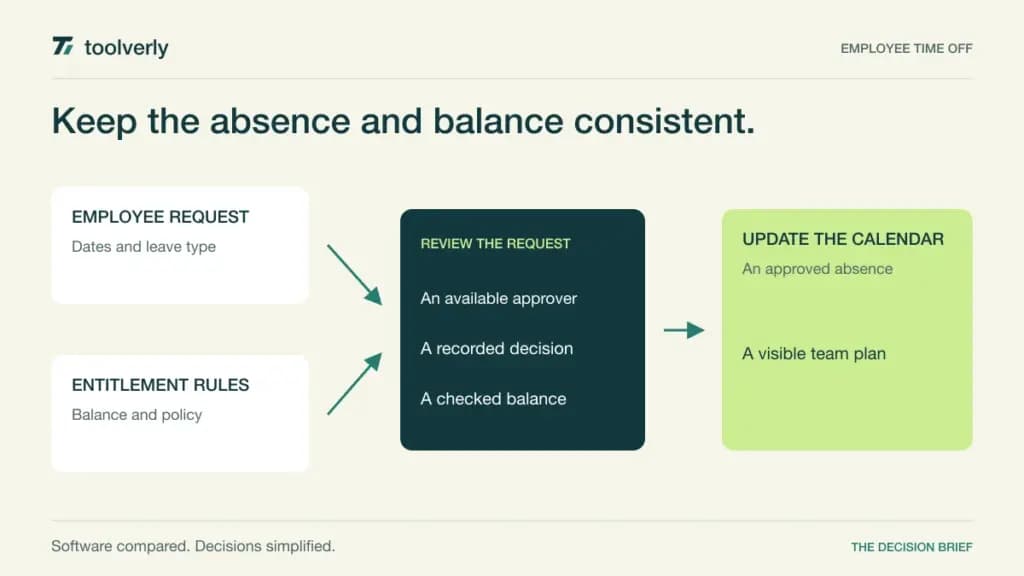
A leave request looks simple until a part-time employee changes their working week, two approvers are away, and a carried balance expires during the requested holiday. The useful system keeps the employee’s entitlement, the approval decision, and the team calendar consistent. A shared calendar alone cannot explain why a balance changed.
This comparison covers Timetastic, Leave Dates, Vacation Tracker, absence.io, and Calamari for employee absence management. The recommendations are editorial judgments based on current official documentation, not hands-on testing. Features and pricing were checked on October 10, 2026. Leave policy remains your responsibility: demonstrate your actual rules rather than assuming a software default represents them.
Start with the hardest recurring case in your company. If managers mainly need a visible holiday calendar, a focused tool may be enough. If entitlements accrue, differ across countries, or require substitute approvals, policy depth matters more than the appearance of the request form. Count everyone whose leave record must be maintained when calculating subscription cost.
Five leave management approaches compared
| Product | Best fit | Main strength | Meaningful tradeoff | Pricing reference |
|---|---|---|---|---|
| Timetastic | Teams wanting a focused absence calendar | Requests, allowances and shared visibility | Accruals and deeper reporting sit in Pro | Displayed $1.50/user/month Business |
| Leave Dates | Visual planners with staged policy needs | Wall chart and allowance tracking | Calendar synchronization requires Essential | GBP Starter £0.75/user/month, billed yearly |
| Vacation Tracker | Slack, Teams and Workspace users | Leave inside existing communication tools | Minimum charges and advanced-policy tiers | EUR monthly view: Core €2/user, €50 minimum |
| absence.io | Companies combining absence and HR administration | Leave with optional attendance and employee files | API access requires Complete | Starter €2.99/user/month before tax |
| Calamari | Teams with detailed entitlement rules | Configurable policies and approval paths | Module charges and a small-team minimum | Per-module calculator; confirm currency and total |
Timetastic
Timetastic’s Business plan connects holiday allowances, approvals, and a shared view of who is absent. Mobile and desktop access let employees request leave and managers review it without maintaining a second spreadsheet. It fits a company that wants absence administration to remain a small, understandable routine.
The checked page displays Business at $1.50 per user per month and Pro at $2.50. Billing is monthly with no minimum term. Pro adds accruals, leave-type allowances and booking limits, company-wide reporting, and stronger access options. Use the applicable currency at checkout; these are the displayed dollar amounts, not a converted local quotation.
The main limitation is policy scope by tier. A cheap calendar subscription is less useful if the way you earn or allocate leave requires Pro. In an evaluation, ask a manager to explain an employee’s remaining balance after a cancelled request and a changed work pattern. Our recommendation is Business for uncomplicated allowances, with Pro shortlisted when policy calculations and organization-wide analysis are central. Do not buy the separate rota package merely to solve holiday approvals.
Leave Dates
Leave Dates puts visual planning alongside allowance records. Its Starter plan includes wall and year charts, days-or-hours allowances, pro-rating, holiday imports, and reporting. That combination suits managers who regularly need to see an absence pattern before approving another request.
The fresh GBP browser view shows Starter at £0.75 per user per month billed yearly as £9, Essential at £1.50 billed yearly as £18, and Plus at £1.88 displayed monthly equivalent with a £22.50 annual bill. VAT is excluded. Monthly billing is available; those annual equivalents should not be presented as monthly-contract rates.
Essential adds calendar synchronization, overlap and handover tools, TOIL, and multi-person requests. Plus adds personalized leave-year dates, SSO, API and webhook connectivity. All employees added count, including people who never sign in; archived leavers stop counting. That matters when a coordinator books leave for an entire team. Shortlist Starter for chart-led planning and Essential when shared calendars or TOIL are required. Check upgrade timing and export access before choosing an annual subscription, especially if your workforce changes seasonally.
Vacation Tracker
Vacation Tracker focuses on leave workflows within Slack, Microsoft Teams, and Google Workspace. Its Core package includes reports, leave policies and notice-period automation, with three locations and ten departments. Complete extends this to unlimited locations and departments, accruals, hourly tracking, TOIL, and multi-level or substitute approval paths.
The clean browser view during this check localized to EUR and monthly billing: Core was €2 per user per month with a €50 minimum, and Complete €4 with a €100 minimum. Annual pricing uses user tiers. Raw page extraction exposed inconsistent placeholder totals, so this comparison uses the rendered monthly amounts and requires a fresh total for your headcount and currency.
The advantage is meeting employees where they already communicate. The tradeoff is that a small team can pay substantially more than multiplying its headcount by the headline seat price suggests. Demonstrate a delegated approval inside the integration your company actually uses, then reconcile the dashboard balance and report. Core fits straightforward leave records in an existing workspace; Complete deserves consideration when policy automation and backup approvers are requirements rather than occasional conveniences.
absence.io
absence.io offers Starter, Pro, and Complete. Starter covers absence and leave management, reporting and downloads, and integrations including Microsoft, Google, and Slack. Pro adds time tracking, digital employee files, and SSO. Complete adds expense and travel administration plus API access.
The checked monthly list shows €2.99, €4.99, and €7.99 per user respectively, net of tax. The page also offers annual billing with a 10% discount. Its September promotion had an explicit September 30 end date; that expired offer is excluded here. A displayed old banner does not make a discount available today.
The strength is expanding from leave into related administration without starting with every module. The limitation is that an integration project requiring an API may force a higher tier even when you do not need expense features. Ask which employee records remain accessible after archiving and how reporting separates leave from actual working time. Starter is the sensible shortlist for absence alone; Pro is more relevant when attendance and employee files share an operational owner. Confirm the active-license definition and tax treatment in your billing proposal.
Calamari
Calamari’s Time Off module supports multiple absence types, country-specific policies, carry-over, and automatic balance calculations. Its official feature descriptions also cover multi-stage approvals, substitute approvers, restrictions, and hours-or-days units. These are useful when the difficult part of leave management is policy configuration rather than entering dates.
Time Off, Time and Attendance, Core HR, and other modules are priced separately. The calculator provides monthly and yearly selections; the help center confirms a minimum subscription fee for teams up to ten users, with per-user calculation above that. Prices exclude VAT. Because the extracted calculator mixes unlabeled numeric states, this guide does not turn a bare number into a verified currency quotation.
Calamari is our shortlist for an organization willing to maintain a detailed rule set. Its flexibility also creates work: someone must own policy changes and verify their effect on existing entitlements. Ask for a quote for Time Off only, then price any SAML or additional-module requirement separately. Demonstrate a new starter, a carry-over expiry, a half-day cancellation, and a manager absence before deciding that the configured workflow is ready.
Choose the policy record before the calendar
Write down your leave year, accrual frequency, rounding, carry-over expiry, working-day patterns, and who can correct a balance. Import several anonymized examples with independently calculated expected results. A successful demonstration should explain each change, including whether the calculation uses the request date or the absence date.
Next, separate employee visibility from HR visibility. Colleagues may need to know someone is unavailable without seeing a sensitive absence reason. Give approvers a backup and establish who resolves disputed balances. An automated approval is useful only when the rule and the owner of exceptions are clear.
Before purchase, check four things: the total cost at your real headcount; the plan needed for policy rules and exports; how leavers and archived records are billed; and how cancellations reach shared calendars. Save the agreed configuration and reconciliation process so the next HR administrator can maintain it.
For broader workforce decisions, see our comparison of employee shift scheduling software. Project commitments need a separate team resource planning view. An approved absence should inform those workflows without replacing their coverage or capacity decisions.
Official sources and verification date
Checked October 10, 2026. Product facts come from the following official pages; fit assessments and evaluation exercises are Toolverly editorial analysis.
Original illustration by Toolverly. Read about our publication or send a correction.