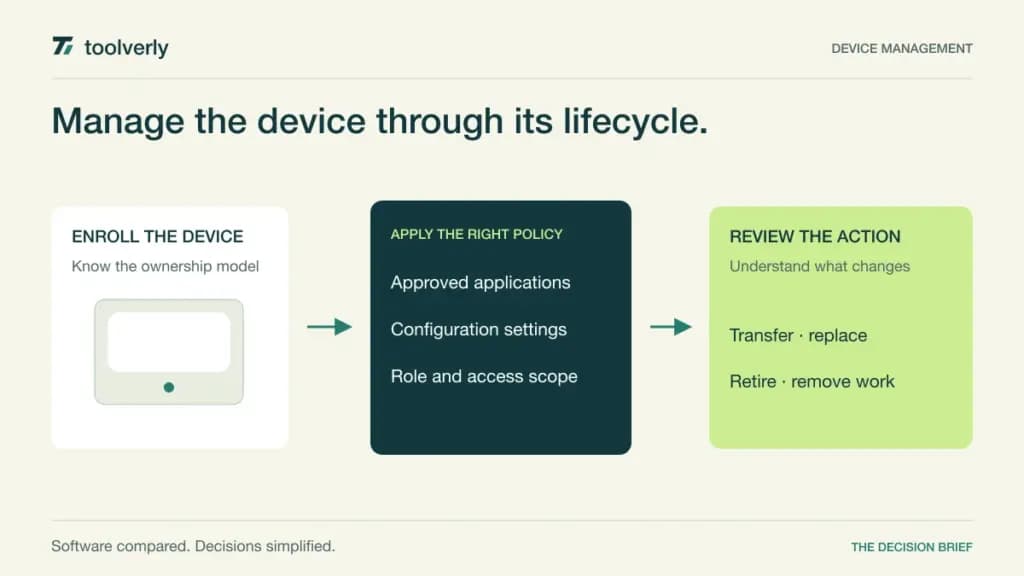
Device management begins with an ownership question. A company laptop, an employee’s personal phone, and a shared kiosk need different controls even when all three access the same business application. A useful platform must support the intended enrollment model, configure the right policies, and help an administrator understand the consequences of each lifecycle action.
Jamf, Microsoft Intune, Hexnode, Scalefusion, and ManageEngine Mobile Device Manager Plus offer different combinations of platform coverage and commercial packaging. Compare the operating systems and management tasks your fleet actually needs. The cheapest advertised device rate may describe a tier that does not include your desktop patching, personal-device, or remote assistance requirements.
How this comparison was prepared
Official product and pricing information was checked October 5, 2026. This is research, not a deployment test, security assessment, or report of successful device wipes. We assess enrollment, application and configuration management, ownership boundaries, relevant tier restrictions, and purchasing units. Any proposed evaluation should use designated test devices and approved accounts, with the effect of destructive actions understood before execution.
| Product | Best fit | Main strength | Meaningful tradeoff | Pricing reference |
|---|---|---|---|---|
| Jamf | Apple-focused fleets | Apple management packages | Mac bundle has a minimum | Mac: USD12.50/device/month, annual, 25 minimum |
| Microsoft Intune | Microsoft-connected organizations | Device and app policy context | Existing license entitlements matter | Review Microsoft 365 and add-on scope |
| Hexnode | Kiosks and growing fleets | Tiered UEM controls | Desktop capabilities vary by tier | Pro: USD2.40/device/month, monthly, 15 minimum |
| Scalefusion | Managed shared devices | Kiosk and application workflows | Entry package is annual | Essential: USD2/device/month, annual, 10 minimum |
| ManageEngine Mobile Device Manager Plus | Edition and hosting flexibility | Cloud and on-premises options | Device bands and technicians affect cost | Free up to 25 devices; paid editions differ |
Jamf
Jamf’s current Mac package is USD12.50 per macOS device per month, billed annually, with a 25-device minimum. The package combines management with identity and protection components. Its mobile bundle has a separate rate; Jamf Now starts at USD4 per device per month for smaller organizations. These are distinct packages, not interchangeable standalone license prices.
Best fit: A business whose administration requirements are centered on Apple devices. Strength: The package structure addresses Apple management together with related operational controls. Limitation: The Mac bundle’s minimum and scope can make a small fleet’s buying decision different from its headline device rate.
List the tasks required for a newly issued Mac, a replacement device, and an employee departure. Ask which package covers each task and which existing identity or endpoint tools remain necessary. A good proposal should explain the responsibilities your team retains. Compare the minimum annual commitment with your actual eligible fleet rather than multiplying a monthly reference rate by only today’s active devices.
Microsoft Intune
Microsoft’s documentation distinguishes device management from application management, including controls for work applications on personal devices. Its current pricing page highlights Microsoft 365 packages and expanded Intune entitlements beginning in July 2026. Confirm your existing subscription, standalone requirements, and any advanced capability add-ons rather than treating a Microsoft 365 suite price as a standalone Intune rate.
Best fit: Organizations already coordinating Microsoft identity, applications, and licensing. Strength: Device and application policies can be considered alongside that existing environment. Limitation: Licensing scope requires a current entitlement review, especially when comparing standard and advanced capabilities.
Start with a company-owned computer and a personal phone used for work. Ask how enrollment, application policy, and access conditions differ between them. Define what the administrator should be able to remove and what personal information should remain outside the management workflow. Request a written mapping from each required capability to your actual licenses. This makes the incremental cost visible without confusing a broad suite purchase with one management function.
Hexnode
Hexnode’s Pro UEM tier is USD2.40 per device per month on monthly billing, or USD2.20 with annual billing, with a 15-device minimum. The entry scope includes mobile and kiosk workflows. More advanced desktop, scripting, application, remote-control, and patching capabilities appear in higher tiers or quoted packages.
Best fit: Teams starting with managed mobile devices or kiosks and comparing a route to wider administration. Strength: The tier structure provides a concrete way to match requirements to packages. Limitation: A low entry price does not establish that every operating system supports every required action in that tier.
Create a matrix with one row per operating system and columns for enrollment, applications, updates, restrictions, and assistance. Ask the vendor to mark the exact tier and enrollment prerequisites for each cell. Include a device that is temporarily offline so your requirements account for pending actions. The commercial comparison should follow the completed matrix, including minimum device counts, technician scope, and the billing term you intend to use.
Scalefusion
Scalefusion Essential is USD2 per device per month, billed annually as USD24 per device per year, with a 10-device minimum. Its published scope includes kiosk and application management workflows. Personal-device support and broader desktop update, patching, and management capabilities are differentiated across higher tiers.
Best fit: Businesses standardizing shared or dedicated devices around a defined application workflow. Strength: Kiosk requirements can be discussed within a clear package structure. Limitation: The annual commitment and higher-tier dependencies matter when the fleet extends beyond simple shared devices.
Describe a typical shift change at a shared device: the required applications, allowed settings, network availability, and escalation route when something fails. Ask how that scenario changes for a personally owned phone or a desktop computer. Keep the requirements separate so a successful kiosk presentation does not stand in for a whole-fleet evaluation. Request a total annual commitment based on the required tier, device count, administrator roles, and implementation scope.
ManageEngine Mobile Device Manager Plus
ManageEngine offers cloud and on-premises deployment, with pricing differentiated by edition, device band, and technician count. A free edition covers up to 25 devices. The Standard cloud pricing table lists a 50-device band with one technician at USD64 monthly or USD645 annually. Larger or differently configured deployments should be compared using their actual edition and hosting model.
Best fit: Buyers who want to compare a bounded free starting point with commercial cloud or self-managed operation. Strength: Hosting and edition choices can be evaluated explicitly. Limitation: Device band pricing and additional technician requirements make a universal per-device estimate misleading.
Document who will administer devices and whether the hosting choice introduces maintenance work for your team. Ask which edition supports the required enrollment, application, and lifecycle tasks, then obtain the price for the next likely device band as well as the current one. If considering on-premises operation, include upgrades and availability responsibilities in the cost comparison. A free small-fleet option is useful only if its scope matches your actual requirements.
Compare the whole lifecycle
An inventory tells you what a device is and who holds it; management defines how it is configured and what actions an administrator can take. Our IT asset management comparison covers physical custody and asset records. Interactive help is another requirement addressed in remote desktop software. Neither substitutes for the enrollment and policy decisions here.
Write separate requirements for company-owned, personally owned, shared, and unattended devices. Include the operating system versions you support and the enrollment services already in use. Specify the intended response when a device is lost, replaced, transferred, or retired. Clarify which actions affect work data only and which can affect the entire endpoint.
A practical buying checklist
- Build an operating-system and ownership matrix before comparing advertised entry prices.
- Map every required action to its exact tier, enrollment model, and prerequisite license.
- Define administrator roles and approval expectations for consequential lifecycle actions.
- Use designated evaluation devices; confirm the scope of removal and reset actions in advance.
- Compare minimum device counts, technician allowances, annual commitments, and the next device band.
- Include implementation, connector maintenance, support, and hosting responsibilities in the proposal.
- Document how management can be removed and device records exported when changing providers.
The best option is the one that supports the controls your fleet needs at a clear total commitment. A complete lifecycle plan is more useful than a low device rate attached to an unsuitable enrollment model or feature tier.
Sources and verification date
Official product information checked October 5, 2026. Prices are published reference points, not binding offers; confirm tax, currency, region, contract term, and package scope before buying.
- Jamf current packages
- Microsoft Intune pricing
- Microsoft Intune overview
- Hexnode UEM pricing
- Scalefusion pricing
- ManageEngine pricing
- ManageEngine product scope
Original illustration by Toolverly. Read about our publication or send a correction.