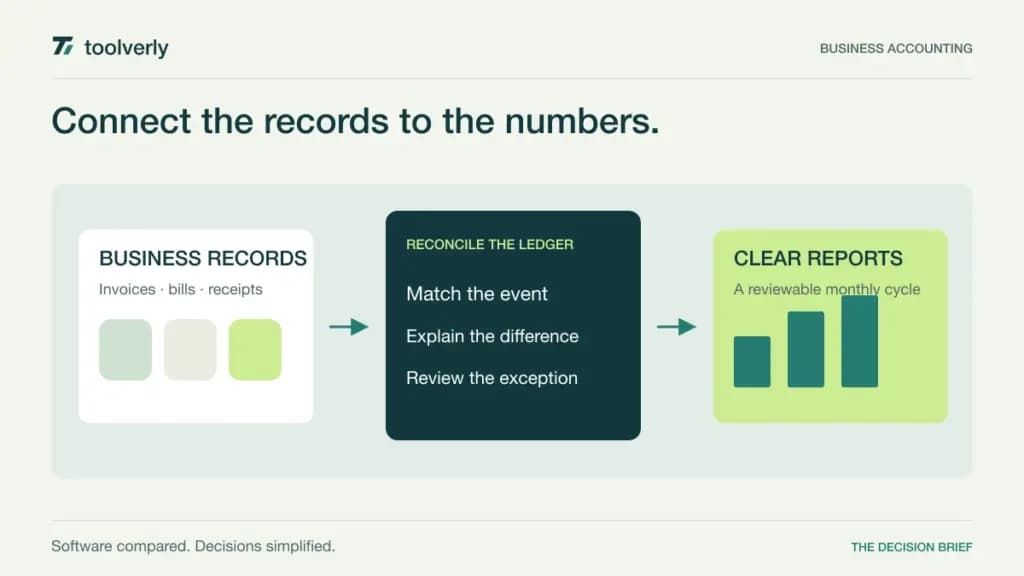
Small business accounting software should help someone explain the numbers. An invoice is issued, a customer pays, a bank transaction arrives, and the books need to show what happened without counting the money twice. The right workspace makes that sequence understandable to the owner, the person maintaining records, and the accountant who reviews them.
QuickBooks Online, Xero, FreshBooks, Zoho Books, and Wave approach that work with different plan limits and operational emphasis. Start with the records you maintain today and the reports you need each month. The cheapest subscription can become an awkward choice if it excludes the users, client capacity, or bookkeeping workflow your business actually requires.
Research checked October 2, 2026. This comparison uses official US pricing and feature pages, without hands-on bookkeeping tests or financial-outcome claims. We distinguish regular rates from temporary introductory discounts. Payment processing, payroll, extra users, taxes, and other services may add cost. Confirm regional availability and the chosen plan with the person reviewing your books.
Five accounting tools compared
| Product | Best fit | Main strength | Price reference | Meaningful tradeoff |
|---|---|---|---|---|
| QuickBooks Online | Businesses planning a broader accounting workflow | Several tiers for expanding operational needs | Simple Start: US$38/month regular US rate | More complex workflows require higher tiers |
| Xero | Teams wanting shared bookkeeping access | Reconciliation and a plan structure without per-user license fees | Early: US$27/month regular US rate | Early limits invoices and bills |
| FreshBooks | Service businesses organizing client invoicing | Client work connected to expenses and reports | Plus: US$43/month regular rate | Client allowance and paid team members matter |
| Zoho Books | Businesses wanting defined organization and user allowances | Bank feeds and progression into purchasing workflows | Standard: US$20/month, or US$15/month billed annually | Features and user counts change by tier |
| Wave | Small businesses starting with basic records | Free bookkeeping with optional automation | Starter: US$0; Pro: US$190/year in the annual view | Bank automation and additional services need attention |
QuickBooks Online
QuickBooks Online offers a progression from Simple Start to Essentials, Plus, and Advanced. The official US pricing page lists Simple Start at a regular US$38 per month, alongside a temporary introductory discount. Higher tiers increase capability and scope; Plus includes inventory and project profitability features. Price the tier that covers your workflow rather than using the smallest headline rate for requirements found farther up the table.
Strength: a business can evaluate a broader operational path without treating every new accounting requirement as a completely separate selection. Give a demonstration a realistic sequence: issue an invoice, receive part of the payment, record an expense, and reconcile the bank activity. Have the bookkeeping owner explain the resulting balances.
Limitation: tier boundaries and optional services can create a larger commitment than the initial offer suggests. Identify who needs access, which reports are essential, and whether inventory or project tracking belongs in the chosen package. QuickBooks Online fits businesses willing to select and maintain a defined accounting setup. Include the reviewing accountant early so the plan and record structure support the month-end process you intend to run.
Xero
Xero’s US plan page lists regular monthly rates of US$27 for Early, US$59 for Growing, and US$97 for Established. Early allows 20 invoices and five bills; Growing expands those workflows, while Established adds capabilities such as multiple currencies, projects, and expenses. The page states that there are no per-user license fees. Introductory discounts should be evaluated separately from these ongoing rates.
Strength: shared access can help an owner and bookkeeping team work from the same record without making the user count the main selection issue. During evaluation, ask one person to enter a transaction and another to find and review it. Then check the bank reconciliation process using a small sample with an obvious duplicate and a partial payment.
Limitation: Early’s invoice and bill allowances are meaningful operational limits. Count the records you expect to create, including busy months, before budgeting around the entry tier. Xero fits teams that value a shared bookkeeping workflow and can choose the appropriate transaction capacity. Do not assume the absence of per-user fees settles permissions or review responsibilities; those still need to be configured and understood.
FreshBooks
FreshBooks places client invoicing and service-business work close to expenses and reports. Its current USD pricing page shows regular rates of US$23 monthly for Lite, US$43 for Plus, and US$70 for Premium, alongside time-limited promotions. Plus includes financial and accounting reports, accountant access, and up to 50 billable clients. Lite permits five billable clients, while Premium removes that client cap. Additional team members are listed at US$11 per person per month.
Strength: a service business can evaluate the record from client agreement to invoice and financial review. Use a sample project with an estimate, an expense, and a delayed payment. Ask the owner to find the outstanding amount and the accountant to locate the supporting record. This keeps the evaluation close to the work the business performs.
Limitation: client count and team access are separate cost drivers. A temporary low price does not remove those limits after the promotion ends. FreshBooks fits service businesses that want invoicing and financial visibility within an approachable client workflow. Choose the reporting-enabled tier deliberately, and confirm how your particular projects and billable-client count will be handled before importing historical work.
Zoho Books
Zoho Books publishes prices per organization with explicit user allowances. The US pricing page lists Standard at US$20 per month with monthly billing, or US$15 per month billed annually, including three users. Standard includes bank feeds and transaction period locking. Professional adds workflows such as purchase orders, inventory, projects, and multiple currencies, with a higher user allowance. A Free plan exists, but check its eligibility and limits for your organization.
Strength: the plan structure gives a buyer concrete questions about access and workflow growth. Ask how the owner, bookkeeper, and reviewer will each work with the same transaction. Demonstrate an invoice correction after a review period, and have the reviewer explain what should happen under your own process rather than relying on an unexplained permission setting.
Limitation: the entry paid rate is not a promise that every operational module is included. Zoho Books fits businesses that want defined organization-level pricing and can map requirements to a tier. Even if employees use another Zoho product, verify the actual connection and data owner. A shared vendor name alone does not establish a reliable handoff between operational records and the books.
Wave
Wave’s pricing page offers Starter at US$0 for invoices, estimates, bills, and bookkeeping records. In the annual USD view, Pro is US$190 per year and adds automatic bank imports, transaction categorization and merging, receipt capture, and automated reminders. Payment processing and other services have separate charges. Wave notes that bank connections rely on Plaid and that not every financial institution is supported.
Strength: a small business can begin with basic records and decide whether automation justifies a paid plan. Evaluate the manual process honestly: enter a few transactions, attach the needed evidence, and prepare the report your reviewer expects. Then compare that workload with Pro using a bank connection that matters to your business.
Limitation: free bookkeeping does not make every connected service free, and an unsupported bank can change the expected workload. Wave fits businesses whose recordkeeping needs match the available workflow and region. Confirm additional-user access, import support, and optional services before choosing on price alone. Keep a clear monthly review process even when the software can categorize transactions automatically; convenience does not determine whether a record is correct.
Choose around a complete monthly cycle
Collect a modest set of representative records before evaluating software: a customer invoice, a partial payment, a supplier bill, an employee purchase, a refund, and an ambiguous bank transaction. Have the person who will maintain the books process that set. Then ask the reviewer to identify what still needs clarification. A clear list of exceptions is a more useful outcome than a demonstration with only tidy sample data.
Separate operational records from accounting records. Your expense management workflow may collect receipts and approvals before the books receive them. An inventory system may own stock movements. Decide which system is authoritative for each item and how corrections travel between them, so an integration does not introduce two competing versions of the same event.
Compare the recurring subscription after promotions end. Add the required users, client capacity, and connected services, then check a busy month. Ask how records and attachments can be exported. Moving to a different package later should be a planned option rather than an emergency caused by an overlooked limit.
- Choose the tier around required reports and actual record volume.
- Verify bank connections and the process for missing or duplicated imports.
- Define entry, review, and correction responsibilities.
- Have the accountant review a sample export and closing workflow.
- Separate introductory discounts from the ongoing operating budget.
QuickBooks Online offers tiered operational expansion, Xero shared access, FreshBooks a client-service focus, Zoho Books explicit organization allowances, and Wave a basic starting point with optional automation. Select the workspace that helps your team explain and review a complete month of business activity.
Original illustration by Toolverly. Read about our publication or send a correction.