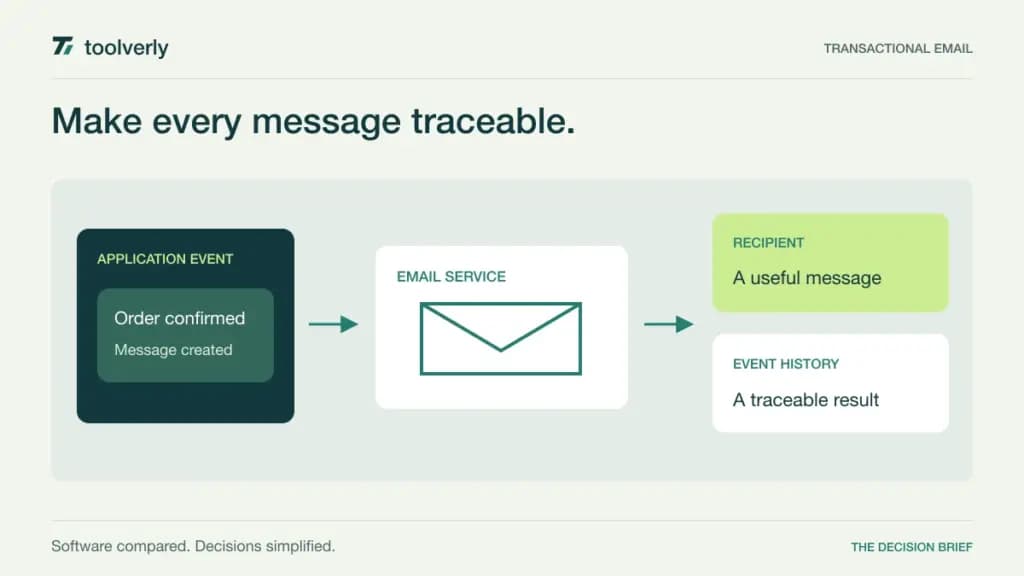
A password reset, order receipt, or account invitation is part of the product experience. When it fails, someone needs to determine whether the application submitted the message, the service accepted it, or the recipient’s mail system rejected it. Transactional email software should make that investigation practical for the people who actually support your application.
This comparison covers Postmark, Resend, Mailgun, Twilio SendGrid, and Amazon SES. We reviewed their official pricing and product details on September 30, 2026. The recommendations are editorial judgments about workflow and purchasing fit, not results from a delivery benchmark or a hands-on production test. Prices below are in USD; taxes, usage additions, and optional services can change the bill.
If your main task is building newsletters, audiences, and campaign journeys, start with our email marketing comparison. Here, the decision is how an application sends individual messages and how your team handles the resulting events.
Compare the operational model first
| Service | Useful starting point | Verified price example | Check before buying |
|---|---|---|---|
| Postmark | Focused message troubleshooting | Basic: $15/month for 10,000 emails | Domain count and inbound processing |
| Resend | Developer-owned email implementation | Pro: $20/month for 50,000 emails | Domain, history, and overage allowances |
| Mailgun | Multiple sending domains and routing | Foundation: $35/month for 50,000 emails | Log retention and support tier |
| Twilio SendGrid | API and SMTP with tiered operations | Essentials starts at $19.95/month | Selected volume and paid extensions |
| Amazon SES | Usage-based sending within AWS | Essentials: $0.16 per 1,000 emails in the first volume band | Pricing model, data charges, and operations |
The subscription examples are not equal-volume quotes. Estimate normal traffic, seasonal peaks, and the number of recipients per event before comparing them. Also distinguish an email being accepted by a provider from it arriving in a person’s inbox: a software purchase does not guarantee inbox placement.
Postmark
Postmark provides SMTP and API sending, templates, suppression handling, and event webhooks. Its separate transactional and broadcast message streams give teams an explicit way to organize different kinds of traffic. At the 10,000-email selection, Basic is $15 monthly with five sending domains and 45 days of data retention. Pro is $16.50 monthly, adds inbound processing, and allows ten domains. Basic overages are $1.80 per 1,000 emails.
Strength: the published retention window is useful when customer support investigates a message several weeks after it was sent. A small application team can evaluate one concrete path from send request to event record without first designing a broad communications program.
Limitation: Basic’s domain allowance and lack of inbound processing may matter more than its send quota. Map production, customer-specific, and test domains before choosing the entry plan. Best fit: a business application with a defined transactional workload and a team that wants understandable message operations. During a trial, have a support colleague locate a deliberately bounced message and explain what action follows. See Postmark’s plans and allowances.
Resend
Resend combines API and SMTP access with tools such as React Email, scheduling, and batch sending. Transactional Pro is $20 monthly for 50,000 emails, with ten domains, five webhook endpoints, and 30-day retention. Enabled pay-as-you-go overages cost $0.90 per 1,000. The free allowance is 3,000 monthly but also has a 100-per-day limit. Resend currently describes monthly billing without an annual discount.
Strength: it is a relevant shortlist choice when developers own both message layout and application integration. The evaluation can begin with the team’s real template components and release process, rather than a separate visual campaign workflow.
Limitation: an apparently adequate monthly free quota can still fail a launch-day workload because of the daily ceiling. Inbound messages also count toward usage; budget them if your application handles replies. Best fit: a product team comfortable maintaining email code and event handlers. Ask who can change a production template, how changes are reviewed, and how the team will notice an accumulating failure queue. Check Resend’s transactional pricing separately from its other email products.
Mailgun
Mailgun’s Foundation plan is $35 monthly for 50,000 emails, with 1,000 sending domains, five days of logs, and one day of message retention. It includes inbound routing and templates; extra emails start at $1.30 per 1,000. Basic is $15 monthly for 10,000, but has one domain and one day of logs. The advertised first month free on Foundation is a trial offer, not its ongoing price.
Strength: the domain allowance makes Foundation worth examining for software that sends on behalf of multiple business units or customer organizations. Routing is also relevant when replies must become structured application work.
Limitation: short history can make a late support request harder to investigate. Decide which events your own system must retain instead of assuming the provider will keep every diagnostic detail indefinitely. Best fit: a technically staffed team with multiple domains and explicit inbound or outbound processing needs. Test how a reply maps to the correct account, including an unknown sender and an expired conversation. Compare log retention, message retention, and support separately in Mailgun’s current plan table.
Twilio SendGrid
Twilio SendGrid offers SMTP and API access, client libraries, dynamic templates, suppression management, and event webhooks. Essentials starts at $19.95 monthly; the actual quote depends on selected sending volume and features. Pro starts at $89.95 monthly. Its free trial permits 100 emails daily for 60 days, so it should not be budgeted as a permanent free production tier.
Strength: the plan comparison exposes operational differences, including webhook allowances and activity history. Essentials lists two event webhooks and three days of activity history; Pro lists five and seven days respectively. That gives a buyer concrete requirements to compare.
Limitation: additional history and other extensions can change the total. Dedicated IPs are included with Pro and Premier, rather than every plan; a dedicated address also creates an operational decision, not an automatic delivery improvement. Best fit: a team that can specify volume, event consumers, and support requirements before selecting a tier. In your proof of concept, verify that duplicate event notifications cannot trigger duplicate customer actions. Use the current Twilio SendGrid Email API pricing page for the final configuration.
Amazon SES
Amazon SES now presents multiple pricing models. Essentials lists $0.16 per 1,000 emails for the first ten million monthly, without a fixed subscription fee. The separate a-la-carte model lists outbound sending at $0.10 per 1,000, with selected features charged separately. These are different configurations, so quoting the lower figure as a universal SES price would be misleading. Outbound attachment data is additionally listed at $0.12 per GB.
Strength: usage-based billing gives an AWS-oriented team a direct way to model sending costs against traffic. Charges count recipients, so one application event addressed to several people is not necessarily one billable email.
Limitation: an attractive unit rate does not include your team’s integration, monitoring, and support effort. Confirm the account’s actual model and optional services before forecasting. Best fit: an organization that already assigns clear ownership for AWS operations and can maintain its email event pipeline. Review a low-traffic month and a seasonal peak with the same assumptions, including attachments and region-specific account choices. Consult Amazon’s current SES pricing rather than reusing a historical estimate.
A practical selection exercise
Prepare five representative messages: an invitation, a reset, a receipt, an operational alert, and a reply that your application must process. Give each a stable application identifier. The useful question is whether a support person can trace the event through your own records and the provider’s history without searching unrelated customer data.
Next, list what happens after a hard bounce, a temporary rejection, an invalid address, and a delayed event callback. Assign ownership for each outcome. Ask the vendor how its documented retry and event behavior fits your design, then verify that behavior in a controlled trial. Do not send experimental traffic to real customers.
Finally, price the whole operating shape: monthly recipients, peak daily volume, domains, retention, webhook endpoints, inbound traffic, and the people who need access. Your internal API documentation should explain message identifiers, event meanings, and the escalation route so that email behavior remains maintainable after the original developer moves on.
Choose the service whose limits and troubleshooting model match that exercise. A slightly higher subscription can be reasonable if it makes routine support work clearer; a usage-based service can be equally sensible when the team already has the necessary operational infrastructure.
Original illustration by Toolverly. Read about our publication or send a correction.