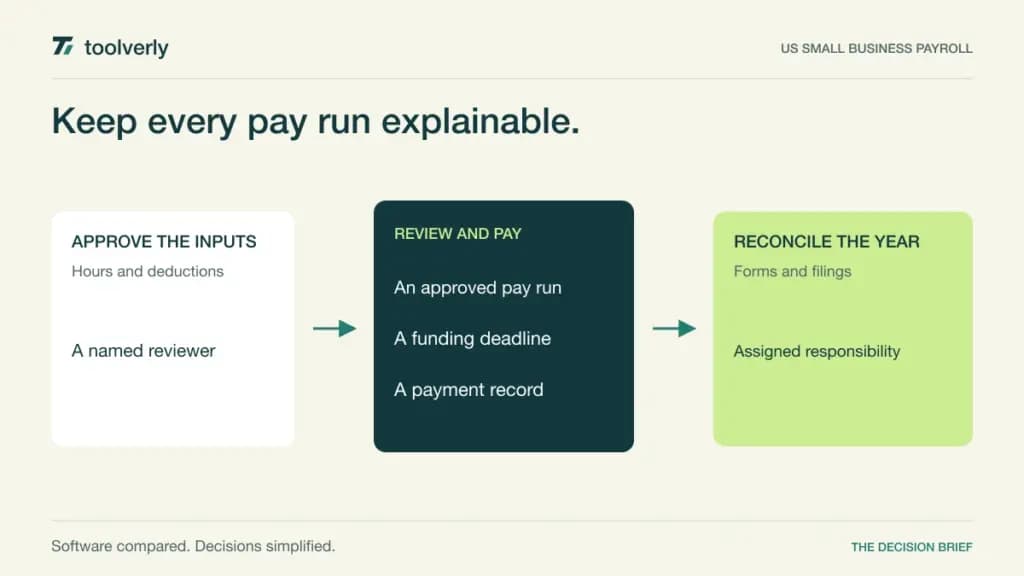
A payroll service needs to turn approved pay information into money workers receive and records the business can explain. The difficult choices concern responsibility: who files taxes, who checks an adjustment, what happens when a worker changes state, and which fees arrive after the monthly subscription. A low starting price answers only one part of that decision.
This comparison covers US small business payroll: Gusto, OnPay, Patriot Payroll, Square Payroll, and SurePayroll. It is based on official product and pricing information checked on October 9, 2026, rather than hands-on testing. The fit judgments below are editorial analysis. These services have different plan boundaries; they should not be treated as interchangeable international payroll providers.
Build the shortlist from your actual workforce. List employees and contractors, operating states, payment schedules, benefits deductions, and the person approving each run. If hours originate in employee scheduling software, establish how corrected hours become final pay inputs. Decide how the resulting payroll journal reaches your accounting system without double-counting payments.
Five US payroll options compared
| Product | Best fit | Main strength | Meaningful tradeoff |
|---|---|---|---|
| Gusto | Payroll with expanding HR needs | Several service tiers | State coverage and extras vary by plan |
| OnPay | Multi-state small teams | Broad core filing scope | HR and time tools add cost |
| Patriot Payroll | Owners choosing filing responsibility | Basic and full-service options | Basic leaves tax filing with you |
| Square Payroll | Businesses already using Square | Payroll alongside existing operations | Contractor-only pricing has a different scope |
| SurePayroll | Small employers seeking assisted setup | Pay runs with support | Year-end and jurisdiction fees need review |
Gusto
Gusto combines payroll with benefits and HR services, with a plan ladder that makes workforce complexity part of the buying decision. Simple is positioned for one-state payroll; Plus adds multi-state coverage, time tracking, and scheduling. Premium includes a named account partner and additional HR support. That progression suits an owner who expects payroll administration to grow with the team.
The strength is having recurring pay runs and related people administration in one service. The limitation is assuming the entry tier covers the eventual workforce. A second state, faster payment needs, or an existing benefits broker can alter the bill. Benefits premiums and eligibility also remain separate questions.
Published monthly USD prices are $49 plus $6 per person for Simple, $80 plus $12 for Plus, and $180 plus $22 for Premium. Gusto states that its plans are month-to-month and include unlimited payroll runs. Review add-ons before comparing totals. Best fit: employers wanting a broader people platform who can identify the necessary tier. Ask for a demonstration of an off-cycle correction using your proposed configuration.
OnPay
OnPay offers Payroll Essentials with employee and contractor payments, multiple pay schedules, and tax handling. Its current pricing page includes multi-state payroll and federal, state, and local filings in the base service. This is useful when the central requirement is processing a geographically dispersed US workforce without making state count the main plan upgrade.
The strength is a clear core payroll scope; the tradeoff is that the surrounding HR and time tools are now separately priced additions. Do not assume an older description of bundled HR still defines the current subscription. Map the exact information that will enter from your time system and which personnel tasks should remain elsewhere.
The published base is $49 per month plus $6 per worker. The page includes unlimited pay runs and year-end W-2/1099 filings, while time tracking, HR enhancements, and selected support services have their own costs. Benefits integrations do not make premiums free. Best fit: small employers prioritizing multi-state payroll and transparent core coverage. Request a total for the base plus only the additions you will operate.
Patriot Payroll
Patriot’s important distinction is between Basic Payroll and Full Service Payroll. Both provide payroll processing, an employee portal, unlimited runs, and contractor payments. Full Service adds federal, state, and local payroll tax filings and deposits. This makes responsibility for filing the first question, before comparing dashboard convenience.
Basic can suit a business with a capable payroll administrator who deliberately retains filing duties. It is a poor shortcut if nobody owns those duties. Full Service is the more relevant comparison when evaluating providers that handle filings. Time and attendance and HR tools are optional additions; accounting software is separately offered.
Standard published monthly USD rates are $17 plus $4 per worker paid for Basic, and $37 plus $5 per worker paid for Full Service. The page also displays temporary introductory discounts; those are not the ongoing rates quoted here. Full Service lists year-end payroll filings without an additional filing fee. Best fit: owners who want an explicit choice of service scope. Evaluate the full-service total if tax handling is part of your purchasing requirement.
Square Payroll
Square Payroll is a practical candidate when the business already runs operations within Square. The pricing comparison separates employee-and-contractor payroll from a contractor-only service. That distinction matters: paying contractors is not the same workflow as maintaining an employee payroll with withholding and employment-related reporting.
The employee service includes unlimited pay runs and tax filing features. Its main advantage is evaluating payroll alongside an existing Square operating environment. The limitation is allowing that familiarity to replace checks on pay inputs, deductions, supported circumstances, and accounting exports. Confirm which time and staff records your particular Square configuration shares.
The US employee-and-contractor plan is $35 per month plus $6 per person paid. Contractor-only service is $6 per person paid each month, without the base subscription. Those are different products, rather than competing prices for equivalent coverage. The page notes a $3 annual fee per mailed W-2/1099 form if mailing is selected. Best fit: Square businesses with a suitable US payroll workflow. Include an employee, a contractor, and one correction in the demonstration.
SurePayroll
SurePayroll by Paychex lists unlimited payroll runs, live phone and chat support, onboarding assistance, direct deposit, and automatic payroll scheduling. It can suit a small employer who wants setup help and a recurring operating routine, rather than a broad internal HR implementation. Ask how support handles a discovered mistake after approval.
The limitation is comparing only the headline price. Its page presents household and small business offers alongside a calculator, with different base amounts. Jurisdiction charges and year-end forms also affect the cost. Identify the business offer in writing instead of treating a household-employer starting price as a company quote.
The checked page variants show starting bases of $29 and $39 per month, with a $7 worker component; confirm the actual small business base in your proposal. Multi-state payroll is shown at an additional $9.99 monthly, with a separate charge for areas requiring local taxes. Year-end W-2 and 1099-NEC forms cost $50 base plus $5 per form annually. Best fit: employers valuing assisted onboarding who budget for the complete service year.
Evaluate one complete payroll cycle
First, create a responsibility sheet. Assign pay-input approval, payroll submission, bank funding, tax notices, corrections, and year-end reconciliation to named people. A provider handling filings does not make inaccurate source information correct. The purchasing decision should reduce unclear handoffs, not create an expectation that no internal review is needed.
Next, request a demonstration using ordinary and exceptional cases: a salaried employee, variable hours, a bonus, a deduction, a new hire, and a final payment. Ask what can still be changed at each stage and which deadlines apply to your funding arrangement. Keep the exercise in a demo environment; evaluating software does not require sending real payments.
Finally, calculate an annual service cost using your workforce, states, selected add-ons, forms, and payment timing. Keep introductory discounts separate. Record whether a worker is charged when active, when paid, or under another account rule. Reconcile the first payroll export against the accounting entry before replacing the old operating routine.
- Confirm the supported workforce and jurisdictions.
- Separate processing from filing responsibility.
- Check approval, funding, and correction deadlines.
- Price benefits, time tools, and year-end forms separately.
- Assign an owner for notices and reconciliations.
Choose Gusto for an identified payroll-and-HR tier, OnPay for its core multi-state scope, Patriot for a deliberate filing-responsibility choice, Square for a suitable existing Square workflow, or SurePayroll for a supported small-employer routine with all additional fees understood.
Official sources and verification date
Checked October 9, 2026: Gusto plans, OnPay scope and pricing, Patriot rates, Square Payroll pricing, and SurePayroll offers and fees.
Original illustration by Toolverly. Read about our publication or send a correction.