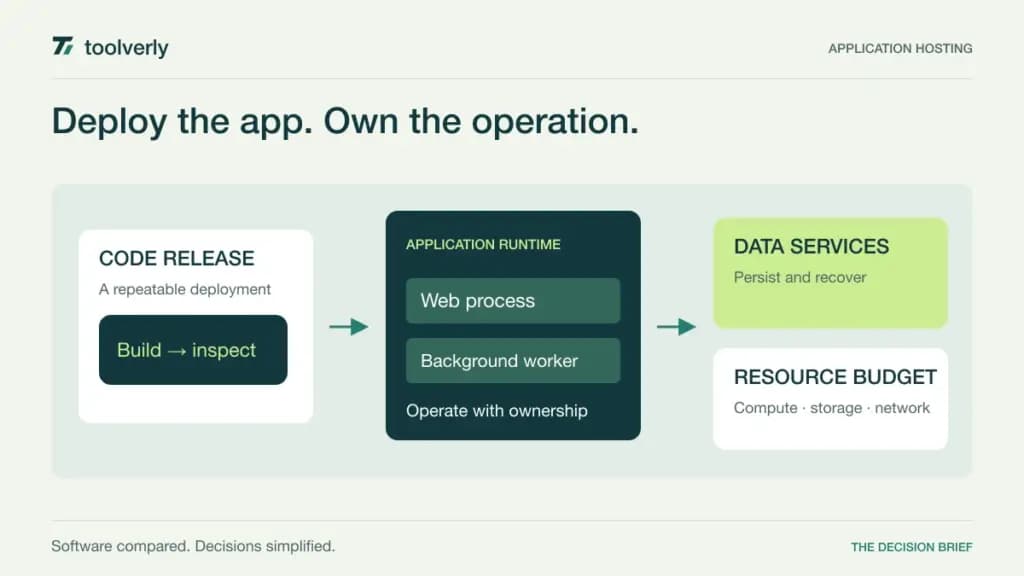
An application hosting platform should make a release repeatable and its running cost understandable. Your application may need a web process, a background worker, a database, storage, and a way to recover from a bad deployment. A low starting price for one container does not describe the complete service your customers rely on.
Render, Railway, Fly.io, DigitalOcean App Platform, and Heroku offer different ways to package that work. Begin with your application’s processes and operating responsibilities. Compare the platform against those requirements before choosing a resource size or assuming that a managed service removes every operational decision.
Research checked October 2, 2026. We used official pricing and product documentation, without deploying benchmark applications or measuring reliability across these vendors. USD figures below are current reference offers. Compute, databases, storage, network transfer, and workspace services may be charged separately. Free and entry-level resources should be assessed against the requirements of the intended workload.
Five application hosting platforms compared
| Product | Best fit | Main strength | Price reference | Meaningful tradeoff |
|---|---|---|---|---|
| Render | Teams wanting a managed application workspace | Separate workspace and service resource choices | Hobby: US$0 workspace plus compute; paid 512MB compute US$7/month | Workspace, runtime, and data services are separate |
| Railway | Teams wanting deployment with usage-based resources | Workspace subscription includes a usage credit | Hobby: US$5 minimum monthly usage; Pro: US$20 | Usage beyond included credits adds cost |
| Fly.io | Teams choosing machine placement and resources deliberately | Granular machine and regional resource control | Usage-priced by selected resources and region | Stopped machines can still incur storage charges |
| DigitalOcean App Platform | Teams wanting managed deployment and clear container prices | Defined shared and dedicated resource options | Shared fixed 512MiB container: US$5/month | The smallest shared instance does not provide autoscaling |
| Heroku | Teams evaluating a dyno-centered application workflow | Application runtime with managed data and add-on choices | Cedar Basic: US$7/month; Standard-1X: US$25/month | Data services, add-ons, and runtime generation need separate choices |
Render
Render’s current pricing page separates workspace plans from compute. Hobby has a US$0 workspace charge plus compute; Pro is US$25 per month plus compute. A paid 512MB compute option is listed at US$7 monthly. Pro includes workspace capabilities such as full-stack previews, environments, and horizontal autoscaling. Databases, disks, and other resource usage need their own budget lines; the workspace fee is not an all-inclusive application bill.
Strength: the separation helps a team discuss collaboration needs independently of runtime size. List the people managing releases and the services running the application. Then evaluate a change that touches both a web process and its background worker. Have another engineer explain how to inspect the release and restore the previous behavior.
Limitation: several small resource choices can add up, and a free option may not match a continuously used production workload. Render fits teams that want managed application operations with an explicit workspace model. Price the database, worker, persistent data, and transfer expectations alongside the web service. Check what a preview environment creates so temporary review resources do not become an overlooked recurring cost.
Railway
Railway’s official plans list Hobby at a US$5 monthly minimum with US$5 of included usage, and Pro at US$20 with US$20 of included usage. Usage beyond that credit is additional, rather than a second charge for all the same included usage. Pro includes unlimited workspace seats. The platform lists deployment, environment, networking, and rollback capabilities alongside resource-based CPU, memory, and storage charges.
Strength: the model encourages a team to budget around the resources its service actually consumes. Build an estimate for the web process, worker, and database using a realistic operating month. Then ask the person monitoring costs to explain what happens when traffic increases or an unnecessary environment remains running.
Limitation: a minimum subscription is not a fixed upper limit on the bill. Railway fits teams that want a connected deployment workspace and are comfortable reviewing usage. Assign someone to inspect the resource and environment list after releases. The useful question is not whether a tiny application can fit inside the credit, but whether the complete workload remains understandable and affordable as it changes.
Fly.io
Fly.io’s current pricing documentation describes resource-based charges for Machines, with costs affected by CPU, memory, and region. Started and stopped machines have different billing behavior. Stopping a machine does not remove every charge: stopped root filesystems are listed at US$0.15 per GB per 30 days. Volumes, snapshots, network usage, and other resources have separate pricing. There is no single small-instance rate that represents every configuration.
Strength: this is a useful shortlist option when a team wants to choose application placement and machine resources deliberately. Specify which process runs where, what state it needs, and how requests reach it. In an evaluation, have an engineer explain the behavior after a process restart and the location of every persistent record.
Limitation: granular control brings more choices to understand and maintain. Fly.io fits teams with enough operational ownership to reason about placement, storage, and usage. Budget inactive resources as well as active compute. Ask what remains after an environment is stopped and how it will be removed when no longer needed; stopping and decommissioning are different operating actions with different costs.
DigitalOcean App Platform
DigitalOcean App Platform provides managed deployment from source or container registries. Its current pricing page lists a US$5 monthly shared fixed container with 512MiB memory and no autoscaling. Larger shared and dedicated choices have different capabilities. The free tier concerns static-site apps, not a free general-purpose server. A 512MiB development database is separately listed at US$7 monthly; do not treat a development database as a production database specification.
Strength: explicit container rows make it easier to compare a known workload with a resource budget. Begin with the application’s memory, process, and database requirements. Then follow a release through deployment, inspection, and rollback. The person who will operate the service should be able to explain the chosen instance type and the reason for it.
Limitation: capabilities advertised for the paid platform are not all available on every container size. DigitalOcean App Platform fits teams that want managed deployment and clear resource choices. Verify autoscaling eligibility, data services, outbound transfer, and any fixed-networking requirement for the actual configuration. A list of platform features cannot substitute for the capabilities of the instance you purchase.
Heroku
Heroku organizes applications around dynos and separately chosen data services. Its current pricing page distinguishes Cedar and Fir runtimes. The visible Cedar table lists Basic at US$7 per month and Standard-1X at US$25, both with 0.5GB RAM. Heroku Postgres, Key-Value Store, and Kafka are separate managed data services. Marketplace add-ons carry their own prices. Specify the runtime generation and complete configuration before using a dyno rate as a budget reference.
Strength: a dyno-centered model gives a team a concrete way to inventory the processes that run its application. Ask the developer responsible for releases to identify web and background work, then explain the attached data services. Include the person responsible for operating issues in that review so deployment convenience and incident ownership are evaluated together.
Limitation: the smallest dyno is only one part of a working application, and runtime choices are not interchangeable assumptions. Heroku fits teams whose deployment process aligns with its platform and whose required data and add-ons can be scoped clearly. Obtain the complete recurring configuration, including collaboration and support needs, before comparing its cost with an alternative that packages those items differently.
Choose around the complete running service
Draw the application’s process map before reviewing price cards. Include every long-running process, scheduled task, database, file store, and external dependency. Identify which data must persist after a restart and who will respond to an operating problem. This often exposes a missing requirement sooner than comparing several small instance prices.
Estimate a normal month and a demanding month. Add temporary environments, retained storage, transfer, and supporting services. Check which charges disappear when a service stops and which require explicit deletion. Keep the assumptions visible so the estimate can be updated when usage changes. A billing model is easier to manage when someone owns that review.
Monitoring remains a separate responsibility. Our cloud log comparison covers investigating application events, and our uptime monitoring comparison covers external availability checks. Decide what evidence reaches the responder when a release fails or users cannot reach the service. A successful deployment message is only one part of that evidence.
- List web processes, workers, data stores, and required regions.
- Demonstrate a failed release, rollback, and restart using your own test application.
- Verify the persistence and recovery plan for each data service.
- Separate workspace charges from compute, storage, and network usage.
- Assign owners for incidents, resource cleanup, and monthly cost review.
Render offers a workspace-and-compute model, Railway included usage credits, Fly.io granular placement and resources, DigitalOcean App Platform explicit managed container choices, and Heroku a dyno-centered ecosystem. Choose the operating model your team can explain and maintain after the first deployment.
Original illustration by Toolverly. Read about our publication or send a correction.