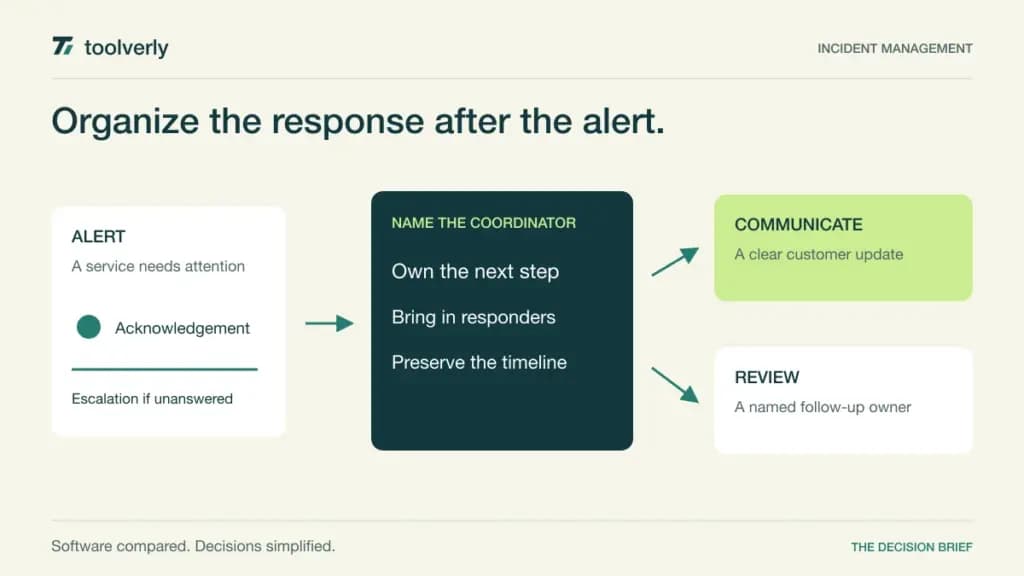
An alert tells someone that a system needs attention. It does not decide who should coordinate the response, how colleagues should join, what customers should hear, or where the explanation will live afterward. Incident management software organizes that human response, connecting the on-call rota with the decisions made during an interruption.
This guide compares PagerDuty, incident.io, Rootly, FireHydrant, and xMatters. The purchasing question is how your team coordinates incidents after a signal arrives. Our comparisons of website uptime monitoring software and cloud log management platforms cover two useful inputs to that process. Buying another alerting source will not resolve an unclear escalation policy or an incident without an accountable coordinator.
Official product and pricing pages were checked on October 4, 2026. This is a source-based comparison, not a report of hands-on testing. Prices below retain their published billing conditions; notification allowances, responders, and separate modules can change the effective cost.
Compare the operating model before the feature list
| Product | Useful starting point | Pricing reference | Scope to check |
|---|---|---|---|
| PagerDuty | On-call response with a wider operations ecosystem | Professional: USD 25/user/month monthly, or USD 21 with annual billing | Automation and AIOps add-ons |
| incident.io | Incident coordination inside Slack or Teams | Basic: free; paid Response and On-call have separate charges | Response seats versus on-call seats |
| Rootly | Chat-led response and retrospective workflows | Incident Response Essentials: listed USD 20/user/month | Billing term and standalone On-Call |
| FireHydrant | Runbooks, services, and responder coordination | Pro: USD 25/responder/month, billed annually | SMS and voice purchases |
| xMatters | Escalations and automated response routing | Starter: listed USD 15/user/month, up to 25 users | Billing term, notification allowances, and automation tier |
PagerDuty
PagerDuty brings on-call schedules, escalations, service context, and incident response into an established operations platform. Its Incident Management Free plan supports up to five users, one schedule, and one escalation policy. Professional is USD 25 per user per month on monthly billing, or USD 21 with annual billing. AIOps, advanced capabilities, runbook automation, and status pages can involve separate purchases. The newer Reliability Platform bundles use another packaging model; do not compare those annual bundles directly with a single Incident Management seat.
Strength: it is a practical candidate when the escalation system is the foundation of the response process and many operational tools must feed it. A central service and ownership model can give responders a common starting point.
Limitation: the breadth creates a scoping exercise. A quoted platform total should identify the modules behind the incident workflow you actually need.
Best fit: organizations with established on-call ownership. In a demonstration, follow one alert through acknowledgement, escalation, coordination, and review; ask which steps need an additional license.
incident.io
incident.io places incident response in Slack or Microsoft Teams. Basic is free and includes incident coordination, a single team’s on-call setup, and a status page. Paid Response plans expand workflows and review capabilities, while On-call is also separately priced. For example, the Pro page lists Response at USD 25 per user per month and an On-call add-on at USD 20 per user per month. Confirm the billing cycle and which people need each component before calculating a combined budget.
Strength: the chat-centered approach can keep coordination close to where a team already talks. The useful question is whether incident roles and decisions remain structured while conversations move quickly.
Limitation: a chat integration is not an ownership policy. Decide how private incidents, cross-team access, and post-incident review will work within your selected tier.
Best fit: teams that want to formalize response without making every participant switch into a separate console. Include occasional responders in the evaluation and check what access they require.
Rootly
Rootly’s Incident Response product combines Slack-based coordination, incident timelines, retrospectives, status pages, and metrics. Essentials is listed at USD 20 per user per month; the page does not establish a billing term for that headline, so request it explicitly. Enterprise uses a quote. Incident Response, On-Call, and AI SRE are separate products, with bundles available. Enterprise features such as private incidents and more advanced workflows should be scoped separately from the Essentials baseline.
Strength: it gives buyers a response-to-review workflow to evaluate rather than only a notification channel. Ask a coordinator to show how an incident’s changing state becomes a usable retrospective.
Limitation: buying Incident Response alone does not establish the cost of a complete paging and scheduling system. Match the quote to your existing on-call arrangements.
Best fit: teams whose main problem is coordination and consistent follow-up. Inspect how a responder joins late, finds the current owner, and separates a useful timeline from conversational noise.
FireHydrant
FireHydrant combines service context, response runbooks, retrospectives, and status communication. Its Free plan allows up to ten responders and two runbooks. Pro costs USD 25 per responder per month, billed annually, and includes five runbooks plus Signals on-call functionality. SMS and voice notifications require separate purchases. Enterprise adds capabilities such as private incidents and broader runbook scope through a quote.
Strength: runbooks make it possible to evaluate a repeatable response sequence: declare the incident, identify the service, coordinate the people, and prepare the review. That is useful when teams currently repeat the same setup manually.
Limitation: a runbook allowance matters only after you map your real incident types. Check whether several teams need separate variants and how notification spending will be controlled.
Best fit: organizations that want service ownership and a defined response process together. Ask who maintains each runbook when the architecture or communication policy changes, and include that work in the operating plan.
xMatters
xMatters emphasizes on-call scheduling, escalation, incident coordination, and automated routing through its Flow Designer. Free supports up to five users. Starter, also labeled Essentials on the pricing page, is listed at USD 15 per user per month for up to 25 users. Base, also labeled Standard, is listed at USD 39. Confirm the billing term, messaging and phone allowances, and the tier needed for the automation demonstrated; the broader platform’s capability list is not a promise that every Starter feature is unlimited.
Strength: it is a useful candidate when response routing and integration logic are central requirements. Evaluate a branching escalation that changes according to the service or acknowledgement state.
Limitation: an elaborate automated flow can be difficult to understand during an interruption. Keep ownership, fallbacks, and maintenance visible.
Best fit: teams coordinating multiple notification paths and operational systems. Ask someone outside the original implementation team to explain an escalation from the configured flow before accepting it.
Choose with one realistic incident exercise
Write a short scenario before requesting demonstrations: a critical service degrades, the first responder does not acknowledge, a second team is needed, and a customer update must be approved. Use the same sequence for every vendor. The output should include the current coordinator, next escalation, affected service, customer message owner, and a review record. A fast notification alone does not demonstrate that the response is organized.
Separate three populations in the budget: people who receive pages, people who coordinate incidents, and people who occasionally contribute. Ask whether each needs a paid seat and whether integrations or automated actors affect licensing. Include voice and SMS in the estimate, particularly for teams that cannot depend on a working chat application during a failure.
Also examine the quiet period after recovery. Who owns action items, how are overdue improvements reviewed, and what can a new engineer learn from the timeline? A retrospective template helps only if the process assigns responsibility for the next change.
- Document the fallback when the primary responder or communication channel is unavailable.
- Check visibility for private incidents and the access of occasional participants.
- Keep paging, response, status communication, and automation modules explicit in the quote.
- Assign maintenance responsibility for schedules, services, integrations, and runbooks.
- Define the minimum record required before an incident is considered closed.
Shortlist PagerDuty or xMatters when escalation routing is the central challenge. Look closely at incident.io and Rootly when chat-based coordination and review are the priority. Include FireHydrant when service context and repeatable runbooks need a shared home. The strongest option is the one whose operating model your responders can explain under pressure and maintain afterward.
Official sources and verification date
Checked October 4, 2026: PagerDuty pricing, incident.io pricing, Rootly pricing, FireHydrant pricing, and xMatters pricing. Reconfirm billing terms and module scope before purchase.
Original illustration by Toolverly. Read about our publication or send a correction.