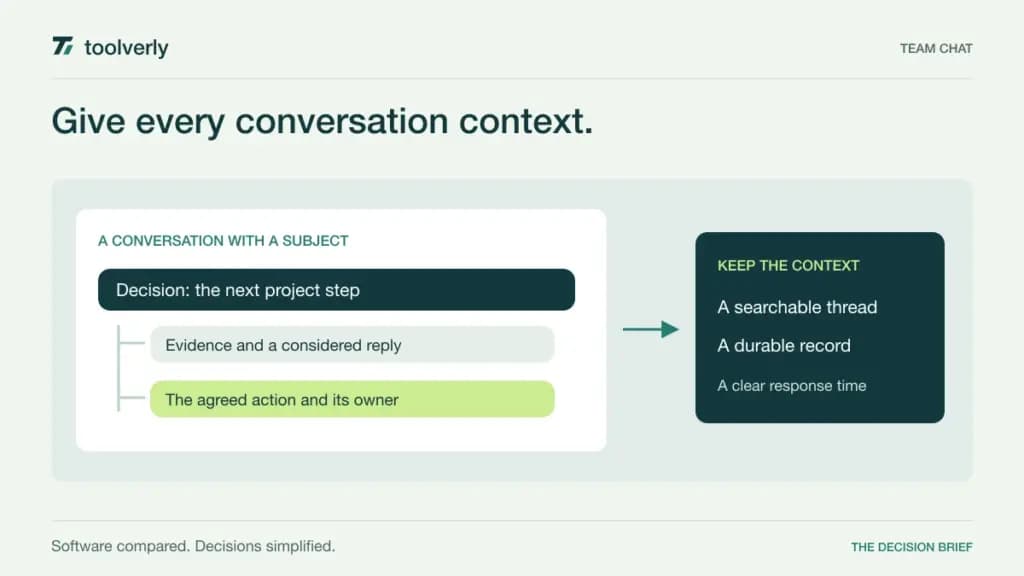
Team chat works when people can find the right conversation, understand who needs to respond, and recover the decision later. A busy message stream can hide those signals. The right software depends on whether your team coordinates through rapid exchanges, organized discussions, or conversations attached to an existing office suite.
This comparison covers Slack, Microsoft Teams, Google Chat, Twist, and Chanty for persistent business messaging. It focuses on channel structure, history, external participants, and the cost of including the people who actually do the work. Official sources were checked on September 25, 2026. This is a documentation-based comparison; we have not measured response speed or adoption in a controlled trial. Listed prices are USD, with billing terms stated beside them.
Agree on communication rules before choosing channels
Write down what belongs in a shared conversation, what requires a direct message, and what counts as urgent. Decide how long a colleague normally has to respond. Without those agreements, changing the interface may simply move the same interruptions into a new application.
Distinguish discussion from durable records. A chat can explain why a choice was made, but approved procedures belong in a team wiki. Working files also need an ownership model beyond a message attachment; our file sharing comparison covers that separate decision. During evaluation, check how a person who joins later finds both the conversation and its current supporting material.
| Product | Best fit | Main strength | Key tradeoff |
|---|---|---|---|
| Slack | Teams coordinating across many apps | Channels and integration ecosystem | Free history is limited |
| Microsoft Teams | Microsoft 365 organizations | Messaging alongside suite services | Licensing and administration need care |
| Google Chat | Google Workspace teams | Conversations close to shared work | Compare the whole Workspace package |
| Twist | Distributed teams using written discussion | Threads organized by subject | Multi-channel guests can be billable |
| Chanty | Small teams combining chat and tasks | Searchable history and simple follow-up | Free membership is capped |
Slack
Slack organizes conversations into channels and connects them with business applications. Its paid plans add unlimited message history and app integrations, while Slack Connect supports work with external organizations. This makes it a practical candidate when people regularly need context from several tools without keeping every discussion inside a single office suite.
The pricing page lists regular Pro pricing at US$7.25 per user per month paid annually or US$8.75 monthly. A temporary discount is displayed separately. Free provides 90 days of accessible message history and up to ten app integrations. Business+ is US$15 per user per month annually or US$18 monthly at the regular listed rate, with additional administration and AI capabilities.
The strength of app-connected channels can also produce too many notifications. Start with one useful integration and define what deserves a channel message. In a pilot, ask someone who was absent to find a decision and its evidence using search. Slack fits teams willing to maintain channel naming and notification rules. Evaluate the history and administration tier you will need after the pilot, because a free workspace is not a complete model of a long-term organizational archive.
Microsoft Teams
Microsoft Teams brings chat and collaboration into the Microsoft business environment. The appeal is strongest when employees already rely on Microsoft identities, documents, calendars, and file services. A message can sit close to the work being discussed, and administrators can consider communication alongside the wider suite rather than adding an unrelated account system.
Microsoft’s US business comparison lists Teams Essentials at US$4 per user per month paid yearly. Microsoft 365 Business Basic with Teams is US$7 per user per month paid yearly and includes services such as business email and cloud storage. These are annual subscriptions. Availability and packages differ by market, so verify that the exact SKU includes Teams.
The main tradeoff is understanding the surrounding administration. File access, external participation, and an employee’s departure should be reviewed together with the account setup. Have a colleague from another department open a conversation and its linked file using the intended permissions. Teams fits a business that wants messaging to follow its Microsoft operating environment. Compare the incremental cost against licenses already held, while ensuring the selected plan supports the actual communication arrangement rather than assuming every Microsoft subscription is equivalent.
Google Chat
Google Chat provides direct conversations and spaces for team communication within Google Workspace. The product overview describes organized collaboration around messages and shared work. It is worth evaluating when employees already spend their day in Gmail and Google documents, because introducing another communication system may add an unnecessary place to check.
The Workspace pricing page lists Business Starter’s regular price at US$7 per user per month with a one-year commitment, billed monthly in the view checked. Business Standard is US$14 on that basis. Team messaging is included in those packages. Promotional discounts are separate from these regular prices; Chat is being compared here as part of the business suite, not as a US$7 standalone chat subscription.
The strength is proximity to the tools a Google-centered team already uses. The limitation is that buying the suite for chat alone changes the value calculation. Test the journey from a conversation to its referenced document, including a person who has access to the space but may not have access to the file. Google Chat fits teams seeking a coherent Workspace routine. Choose the suite edition around all required services and administration, rather than letting the messaging feature decide an otherwise larger purchase.
Twist
Twist emphasizes topic-based threads and asynchronous discussion. Its structure is relevant when a team works across time zones or needs a thoughtful written response more often than an immediate exchange. Keeping a discussion attached to a subject can make it easier for someone to return later and understand the sequence of reasoning.
The official pricing page shows Unlimited at US$6 per user per month with yearly billing selected. It includes full conversation history, unlimited integrations, and unlimited storage. Free exposes one month of comments and messages. On the paid plan, single-channel guests are free, while multi-channel guests are billed like members.
That guest rule matters for consultants or clients who need to join several discussions. Model their actual channel access before comparing a headline seat price. The wider limitation is a change in working habits: people need to write clear subjects and enough context for a later response. Try running one project discussion without expecting immediate replies, while keeping an agreed route for urgent issues. Twist fits teams that actively want that style of communication and are willing to support it with response expectations and well-scoped threads.
Chanty
Chanty combines team messaging with task management, including turning a message into a task. Its free offering includes searchable history, public and private chats, voice messages, and one-to-one calls. That combination makes it a candidate for a small team whose main requirement is keeping everyday discussion and straightforward follow-up in the same place.
The current pricing page limits Free to five team members. Business is displayed at US$3 per user per month with annual billing selected, adding group calls and broader collaboration and administration features. Enterprise requires a sales quote. The distinction between the member allowance, guest access, and the exact administration capabilities should be checked against the proposed team setup.
The main attraction is a manageable starting point for a small group. The tradeoff is deciding when conversation-linked tasks need to move into a more structured delivery system. During evaluation, turn one message into an assigned action and check whether the owner can see its status later without searching through the chat. Chanty fits teams that want simple coordination and will benefit from that connection. Include your expected next few hires in the budget so the free membership ceiling does not become a surprise.
Evaluate a week of work and a month of history
Run the same routine in two shortlisted products: a project update, an ordinary question, a decision that needs several comments, and a message involving an external collaborator. Define the expected response time before starting. Review whether participants can tell a request from a status update and whether notifications reach the people who need them.
Then test the historical view. Ask someone to find why a choice was made and which document now represents it. Review what happens when a person changes teams, leaves the company, or no longer needs guest access. Include a check of mobile notifications, because a manageable desktop experience can still produce unnecessary interruptions on a phone.
Compare the annual cost for employees and billable guests, adding the administration tier your organization actually requires. Slack is a useful candidate for communication across many applications; Teams and Google Chat deserve an early look where their suites are already established. Twist suits deliberate written discussion, while Chanty is worth considering for compact teams connecting chat to simple tasks. Choose the system that supports clear ownership and recoverable context, then maintain the communication rules that make those features useful.
Original illustration by Toolverly. Read about our publication or send a correction.