A shared folder can become a business dependency surprisingly quickly. Clients use its links, employees work from synchronized copies, and project managers assume the latest version is there. Choosing a file-sharing service therefore involves more than buying terabytes. You need to decide who owns the files, how outsiders receive access, and what happens when the original uploader leaves.
Dropbox, Box, Google Drive, Microsoft OneDrive, and Proton Drive offer different routes through that decision. This comparison focuses on business file collaboration and external sharing, based on official sources checked on September 24, 2026. We have not measured transfer speed or performed a security audit. Price examples use the stated billing terms and exclude introductory promotions; confirm local currency and applicable taxes before purchasing.
Start with ownership and the recipient
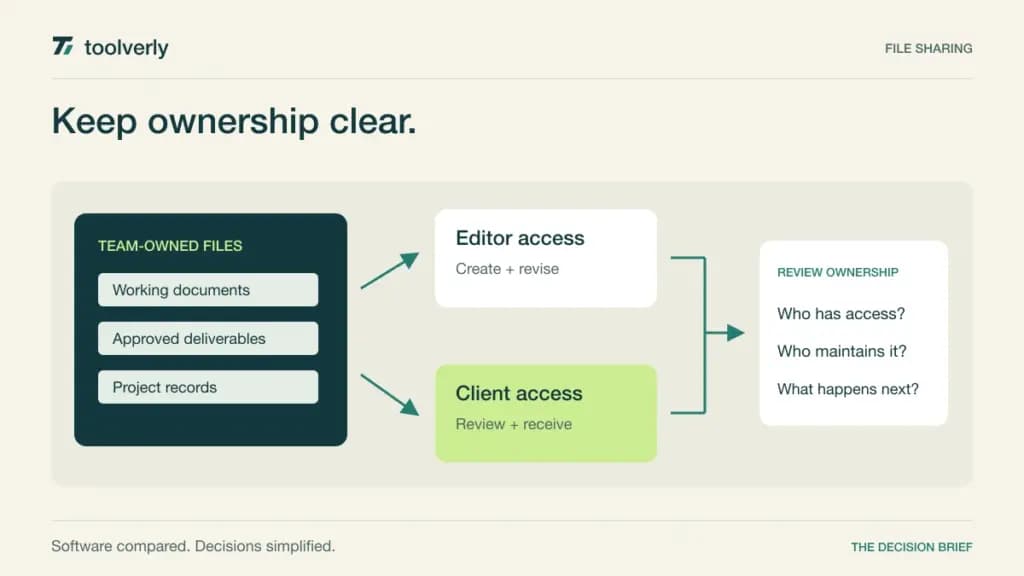
List the files people actively edit, the finished files they deliver, and the records they retain. Those groups may need different permissions. A client who downloads a final design is not necessarily a collaborator who should browse the entire working folder. A colleague reviewing one document does not automatically need access to the rest of a department’s material.
Also distinguish file storage from an organized knowledge base. Our team wiki comparison covers maintained explanations and searchable institutional knowledge. The file service holds the underlying assets. For employee onboarding, use the access responsibilities in our business password manager guide as a separate planning exercise; sharing a folder should not require sharing someone’s login.
| Product | Best fit | Main strength | Meaningful tradeoff |
|---|---|---|---|
| Dropbox | Teams delivering and synchronizing working files | Team folders, sharing controls, and recovery options | Advanced administration belongs to higher tiers |
| Box | Organizations managing content across many collaborators | Business content administration and external collaboration | Upload limits and external-user terms vary by tier |
| Google Drive | Teams already working in Google Workspace | Collaborative documents and organization-owned shared drives | Pooled storage needs organization-wide planning |
| Microsoft OneDrive | Businesses using Microsoft 365 documents | File access within the existing Microsoft environment | Team content architecture also involves SharePoint |
| Proton Drive | Teams prioritizing encrypted file collaboration | End-to-end encryption and business administration | Existing document and integration workflows need evaluation |
Dropbox
Dropbox is worth considering when work moves between local folders and external recipients. The useful buying question is how a project goes from active editing to controlled delivery. A team needs both a place to work and a clear way to distinguish the approved output from the files still being revised.
The official plan comparison lists Standard with team folders, sharing management, groups, and 180-day file recovery. The observed annual USD offer is $15 per user per month and starts with 3 TB for the team. Advanced starts at $24 per user per month on annual billing, requires at least three people, and adds higher-tier administration and a longer recovery window. Regional offers differ.
The strength is a file-oriented workflow with explicit team controls. The limitation is that a large storage allowance does not include every administrative capability. Ask the administrator to demonstrate the proposed plan’s access review and recovery process, then ask a client to retrieve a delivery. Dropbox fits teams whose core work remains files, folders, and clear handoffs between companies.
Box
Box is a strong candidate when content is a managed organizational resource rather than a collection of individual folders. Its business plans distinguish storage, upload size, external collaboration, and administrative controls. Those distinctions are especially useful when the company works with a changing group of agencies, suppliers, or customers.
Box’s published US pricing shows Business at $15 per user per month with annual billing and a three-user minimum. It includes unlimited storage with a 5 GB single-file upload limit and paid external collaborators. Business Plus is $25 on the same annual basis, with a 15 GB upload limit and unlimited external collaborators. Unlimited storage does not remove upload or bandwidth conditions.
The strength is a plan structure that makes content administration a first-class buying concern. The limitation is that a small internal team with many outside collaborators may outgrow Business for reasons unrelated to storage. Model the actual collaborator list and largest files before selecting a tier. Box fits organizations that want to standardize content access and can assign someone to maintain that structure.
Google Drive
Google Drive fits naturally when teams already write and review material in Google Workspace. The architectural choice matters as much as the subscription: a collection of links to employees’ personal work areas is different from a shared location with a durable organizational owner.
Workspace pricing lists Business Standard at a regular $14 per user per month with a one-year commitment, billed monthly, and 2 TB of pooled storage per user. Pooled means the allowance is shared across the organization. Google’s shared-drive documentation explains that shared-drive files belong to the team rather than an individual.
The strength is combining collaborative work with an ownership model that can outlast one employee. The limitation is the need to design shared drives, groups, and outside access deliberately. Pilot a project with a real external reviewer and inspect what they can actually see. Drive suits Workspace teams prepared to distinguish personal working material from records that belong to an ongoing business function.
Microsoft OneDrive
OneDrive is a sensible option when the business already works in Microsoft 365. However, the decision should include the surrounding content structure. A team needs to know whether a file is personal working material, something shared temporarily, or a permanent team resource.
The business comparison lists Microsoft 365 Business Basic at $7 per user per month, paid yearly with automatic renewal, including 1 TB of cloud storage per user and web and mobile applications. Microsoft’s file collaboration guidance recommends SharePoint for documents managed by a team or shared broadly.
The strength is working within an existing identity and document environment. The limitation is that buying OneDrive capacity does not itself establish the right team architecture. Ask an administrator to identify the intended location for each project and demonstrate sharing from there. OneDrive fits businesses that can make this distinction clear to employees and avoid creating several competing copies of the same document.
Proton Drive
Proton Drive deserves a place on the shortlist when encrypted collaboration is a central requirement. Its business proposition includes file sharing, document editing, and administrative features alongside end-to-end encryption. Evaluate that combination against the team’s actual daily work rather than treating the encryption label as the whole buying decision.
The live business pricing page displayed Drive Professional at $7.99 per user per month, billed $95.88 every twelve months, with 1 TB per user. The rendered comparison showed a two-user starting requirement. It lists end-to-end encryption including metadata, user administration, access control, and document and spreadsheet editors. Taxes may apply.
The strength is an integrated offering for teams that prioritize this protection model. The tradeoff to evaluate is compatibility with the files, devices, and connected applications already in use. Try a representative document, a large delivery, and a collaborator outside the company. Proton Drive fits when those workflows work acceptably and the organization has a clear plan for recovery and administrator responsibility.
Test the file lifecycle, not an empty folder
Build a small evaluation folder from non-sensitive examples of actual work. Include a large asset, an editable office document, a finished PDF, and several versions with similar names. Have two colleagues work on it using their normal devices. Note where they see synchronization state, conflicting edits, and the most recent approved version.
Then share a single item with an outside reviewer. Check the difference between a named invitation, a broadly accessible link, and access inherited from the parent location. Revoke the intended permission and verify the result from the recipient’s perspective. This is a purchasing test to perform, not a claim that we conducted an access-control assessment of these products.
Finally, rehearse an ownership change using test accounts. Determine who can retrieve a departed employee’s work, which client links depend on that account, and who pays for retained data. A successful upload is the beginning of the lifecycle; a manageable handover is the more revealing test of the business setup.
Budget for the team you actually have
Compare subscriptions with the same internal headcount and the same outside collaborators. Include minimum seat purchases, required administration, storage growth, and the largest individual file. Record whether storage is pooled for the team or allocated per user. Those differences make a headline cost per terabyte a poor substitute for a complete estimate.
- Assign an owner for each shared location and a backup administrator.
- Define where working files end and approved deliveries begin.
- Check guest access, link expiry, recovery windows, and export paths on the exact plan.
- Budget migration time and training alongside the recurring subscription.
Start with Drive or OneDrive when the existing office suite already supports the work. Compare Dropbox for file-centered delivery and synchronization, Box for managed business content and external collaboration, and Proton Drive when encrypted collaboration is a deciding requirement. Favor the service that makes ownership and recipient access understandable throughout the life of the files.
Original illustration by Toolverly. Read about our publication or send a correction.