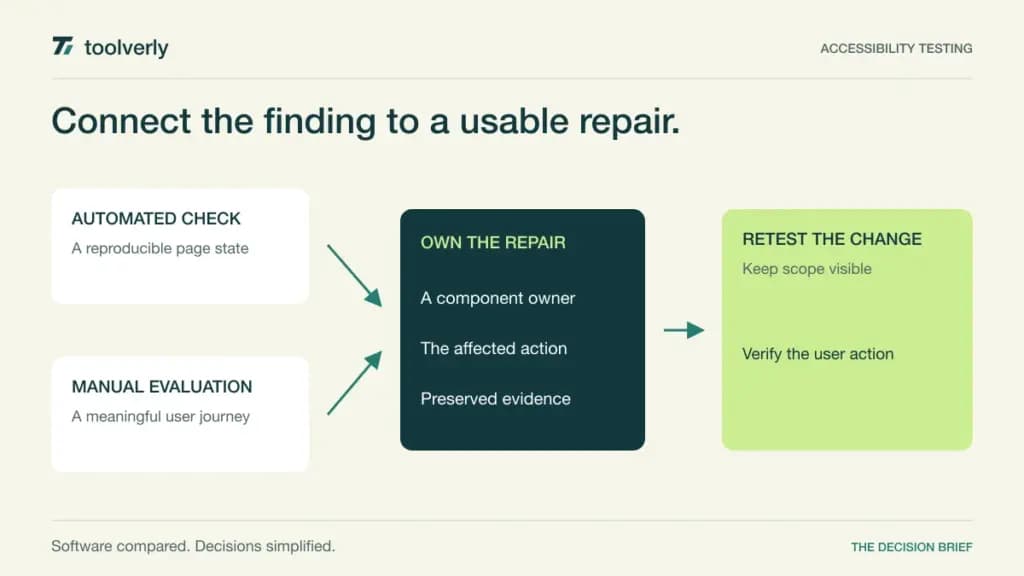
A website accessibility finding is useful when someone can reproduce the barrier, understand its effect on a user, and verify a repair. A scan that produces hundreds of repeated warnings without ownership can leave a team busy while the same checkout or application form remains difficult to use.
Axe DevTools, WAVE, Accessibility Insights for Web, Siteimprove, and Pope Tech support different parts of this work. Browser checks help investigate a specific page or state. Guided manual evaluation makes human judgment more repeatable. Site scanning and reporting help coordinate an estate of changing pages. These approaches can complement one another.
We checked official product information on October 7, 2026. This comparison covers technical evaluation and remediation workflows. We did not conduct a comparative accessibility audit, and no tool purchase or automated score establishes that an entire site is accessible. The right shortlist combines detectable issues with manual evaluation and a maintained repair process.
Five accessibility evaluation workflows
| Product | Best fit | Main strength | Meaningful tradeoff | Price context |
|---|---|---|---|---|
| Axe DevTools | Development teams checking changes throughout delivery | Browser, development, and automated workflow options | Free and commercial products have different scope | Free entry tools; scope-specific commercial proposal |
| WAVE by WebAIM | Page-level visual investigation by authors and developers | Contextual indicators supporting human review | The free extension is not an estate-wide work queue | Free browser extension; API and enterprise separate |
| Accessibility Insights for Web | Teams wanting a guided browser assessment | Automated checks with keyboard and manual guidance | Manual work and recorded page states remain necessary | Open-source browser tool |
| Siteimprove | Organizations coordinating a broad digital estate | Continuous monitoring and remediation governance | Estate, services, and integration scope need definition | Configured proposal |
| Pope Tech | Teams needing page-tier scanning and shared reports | WAVE-powered scanning with organizational reporting | Page limits and advanced manual tracking vary by tier | Free 25 pages; Team from $25/month annually |
Axe DevTools
Deque positions Axe DevTools across browser, development, and CI/CD workflows, with separate web and mobile offerings. The product includes automated and guided testing options and reporting. Its website also identifies free tools, including the Axe DevTools browser extension and axe-core library, alongside commercial capabilities.
The strength is placing checks where developers already inspect and change interfaces. Evaluate a component in its meaningful states: unopened and open, valid and invalid input, loading and completed action. A page scan at one moment does not represent every state a user encounters.
The limitation is treating all Axe-branded tools as one subscription or one identical feature set. Ask for the exact browser, guided-test, automation, and reporting scope. No numerical commercial package rate was established in the product information reviewed here; obtain a scoped proposal instead of applying an old extension price to the whole platform.
Axe DevTools fits development teams that can connect findings to component ownership and release work. Ask the demonstrator to show how a recurring shared-component issue is recognized and how a repair is verified. Keep manual keyboard and assistive-technology evaluation in the process; Deque explicitly states automation complements those methods.
WAVE by WebAIM
WAVE, from WebAIM, presents accessibility indicators in the context of a page. The free Chrome, Firefox, and Edge extensions allow evaluation inside the browser, including dynamic or protected pages. The official site distinguishes these tools from the WAVE API and larger enterprise uses.
Its strength is helping a content author or developer understand where a result occurs. An icon beside a control can be more useful for investigation than a distant row in a spreadsheet. Review the page structure and explanatory information alongside errors instead of assuming every highlighted item is a confirmed barrier.
The limitation is the work around the browser session. A free extension does not by itself assign repairs across departments, maintain a scheduled estate inventory, or document every manually tested journey. If you need those functions, evaluate an additional coordination process or a scanning service.
WAVE is a good starting point for teams doing contextual page review, especially when authors need to understand what a template produces. Its browser extension is free; API and enterprise deployment have separate scope. During evaluation, inspect a form error and a navigation state, then record the human decision and retest evidence in the team’s existing issue workflow.
Accessibility Insights for Web
Accessibility Insights for Web is an open-source extension for Chrome and Edge. Its official overview describes FastPass, combining automated checks with keyboard tab-stop guidance, and Assessment, combining automation with step-by-step manual tests. The documented assessment scope is WCAG 2.1 Level AA.
The strength is structuring a human evaluation rather than stopping at an automated list. A team with basic HTML skills can follow the guidance and preserve a consistent sequence of checks. This is helpful when different developers otherwise interpret keyboard behavior or manual inspection very differently.
The limitation is assuming a guided assessment removes the need for judgment or covers every later standard requirement by default. Confirm the current documented scope against your evaluation target. Record the page version and state, and identify which checks still require a skilled reviewer.
This tool suits teams that want a maintained assessment habit inside the browser without starting with an enterprise scanning purchase. The open-source tool still costs staff time to use and interpret. Evaluate whether a second reviewer can understand the recorded result and reproduce the relevant interaction, rather than measuring success by how quickly someone finishes FastPass.
Siteimprove
Siteimprove’s current Accessibility offering emphasizes continuous monitoring, prioritization, remediation, and governance across a digital estate. Its page describes public and authenticated content, documents, and connections to development workflows. Consulting, education, and manual testing are also presented as part of the wider service relationship.
The strength is organizational coordination. For a business with many content owners, the useful demonstration is a finding moving from a shared template to the correct responsible team, then into a verified repair. Central visibility should preserve enough detail for the person making the change.
The limitation is scope. A broad platform description does not specify which sites, authenticated journeys, document checks, integrations, and expert services your agreement covers. The reviewed product page requests a demonstration; a numerical subscription rate was not established. Obtain a proposal listing the estate and service boundaries.
Siteimprove belongs on the shortlist when repeated monitoring and accountable ownership across departments are the primary problem. Judge its automation and AI assistance on traceable findings and reviewed changes, not claims of automatic conformity. Ask which manual checks remain, how exceptions are recorded, and how your team keeps the original evidence after a content refresh.
Pope Tech
Pope Tech uses the WAVE testing engine for site scanning, reporting, and progress tracking. That relationship is important: Pope Tech and the WAVE extension provide different workflow scope, but should not be treated as independent engines whose agreement proves that a result is correct.
The strength is a defined page-based service with shared organizational access. Free covers a 25-page tier, one website, and two users. Team introduces unlimited users and websites within the selected page allowance. Rescanning lets teams review repairs without interpreting every repeat scan as a new licensed page.
Team starts at $25 per month equivalent for 50 pages billed annually, or $30 with monthly billing. Business Plus starts at $225 per month equivalent for 500 pages annually, or $270 monthly, and adds capabilities such as manual-testing tracking and authenticated scanning. Professional adds further training and support scope.
The limitation is page-tier accounting and package boundaries. An archived page does not always become an immediately replaceable allowance after it has already been scanned that month. Pope Tech fits teams needing scheduled scans and reports with explicit page economics. Evaluate the templates, manual tracking, and support level required before choosing the smallest numerical tier.
Choose around a real user journey
Select a small representative journey: finding information, completing a form, recovering from an error, and confirming completion. Include a shared navigation component and a dynamic state. Run automated checks, then review keyboard behavior, meaning, and relevant assistive-technology interaction with qualified people.
Track the affected user action, reproducible state, responsible component, and repair. Retest after the change. A falling issue count can result from fewer scanned pages or suppressed findings, so preserve the scanning scope alongside progress reports.
- Identify automated checks, guided manual tests, and remaining expert work.
- Confirm coverage of authenticated and dynamic states.
- Separate browser tooling from scheduled estate monitoring.
- Budget page tiers, seats, services, and reviewer time.
Our usability testing comparison covers observing participant task completion. Our test management guide covers organizing release evidence. Choose accessibility tools for technical barriers, human evaluation, and a repair trail that connects a finding to a usable interface.
Official sources and verification date
Product and pricing information checked October 7, 2026. These official references support the documented capabilities and commercial boundaries above; the evaluation advice is Toolverly editorial analysis.
- Axe DevTools product scope
- WAVE evaluation tools
- Accessibility Insights overview
- Siteimprove Accessibility product
- Pope Tech page-tier pricing
- WAVE browser extensions
- Accessibility Insights web assessment documentation
Original illustration by Toolverly. Read about our publication or send a correction.