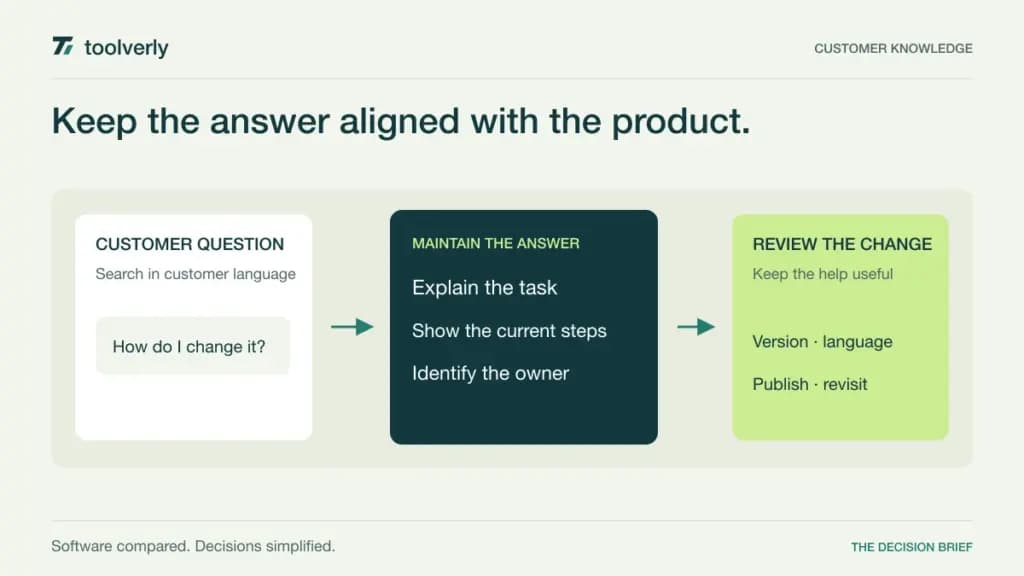
A customer knowledge base should answer a question before someone needs to open a ticket. That means more than publishing a folder of articles: the answer must be findable, current, understandable, and connected to the product the customer is using. The difficult work is often keeping published instructions aligned with a changing service.
This comparison covers Document360, Helpjuice, HelpDocs, KnowledgeOwl, and ProProfs Knowledge Base. The primary decision is how to run a customer-facing help center and maintain its content. Our guide to customer support helpdesk software covers handling conversations after a request arrives, while team wiki software focuses on internal collaboration. Those systems can complement a public knowledge base, but their publishing and access requirements differ.
Official sources were checked on October 4, 2026. We compared published capabilities and commercial terms, without claiming hands-on testing. Author counts, language allowances, AI credits, and separate branding charges matter more than an apparently low headline subscription.
Compare publishing scope and author costs
| Product | Useful starting point | Pricing reference | Boundary to review |
|---|---|---|---|
| Document360 | Structured documentation and publishing governance | Custom quote | Projects, authors, languages, and workflow scope |
| Helpjuice | Search and collaborative knowledge publishing | Essential: USD 249/month, 30 users and 12 GB | AI Suite and higher-tier access features |
| HelpDocs | Customer help centers with contextual assistance | Sprout: EUR 119/month on monthly billing, five editors | Editor seats, languages, and AI credits |
| KnowledgeOwl | A focused knowledge base with separately priced authors | Basic: USD 100/month, one base and one author | Extra authors, extra bases, and access controls |
| ProProfs Knowledge Base | A small public help-site starting point | Free: one author and 25 pages | Paid expansion and USD 300/year custom-domain branding add-on |
Document360
Document360 supports structured article publishing with Markdown and visual editing, revision history, reusable content, categories, search, and analytics. Its product also provides embedded help and content workflow options. The current pricing page asks buyers to configure a quote; it does not publish a universal entry price. Ask which projects, authors, readers, languages, and workflow capabilities the quote includes rather than relying on an older fixed-price plan found elsewhere.
Strength: the scope suits a documentation operation that needs a repeatable route from draft to maintained public instruction. Reusable elements can be particularly relevant when the same prerequisite appears in several guides.
Limitation: structured publishing needs an editorial owner. A detailed workflow can become a queue of abandoned reviews if no one decides who approves routine changes.
Best fit: teams maintaining a substantial product help center. Demonstrate one article update, one shared-content change, and a language revision so the quote reflects the publishing process rather than a presentation of isolated features.
Helpjuice
Helpjuice’s Essential plan is USD 249 per month for 30 users and 12 GB of storage. It includes core search, analytics, revision history, and customization capabilities. The AI Suite is not included in that entry tier. The USD 449 per month plan supports 100 users and 24 GB, with the page placing its AI Suite and SSO in that higher offering. Confirm the contract’s billing term; a monthly price label does not establish every commercial condition.
Strength: it gives a larger authoring group a straightforward baseline to discuss search quality and collaborative maintenance. Evaluate whether support staff can contribute a correction without disrupting the published answer.
Limitation: buyers looking primarily for AI assistance should price the relevant tier, not treat the Essential amount as the complete cost.
Best fit: organizations with several contributors and a shared publishing owner. Ask the vendor to explain user roles, review permissions, storage growth, and how a confusing search result becomes an assigned content improvement.
HelpDocs
HelpDocs publishes a customer help center with unlimited public viewers and articles, an API, and a contextual Lighthouse widget. The checked pricing page displayed euros with monthly billing selected: Sprout was EUR 119 per month for five editors, three languages, and 1,000 AI credits. Bloom was EUR 279 with 15 editors and broader access features. Shared Clips and Variables support reuse; stronger permissions and authentication controls depend on the selected tier.
Strength: the pricing separates the people who edit from the customers who read. That makes a small editorial team’s public distribution needs easier to describe.
Limitation: language counts and AI credits still create practical boundaries. Unlimited articles do not mean unlimited translation work or every private-access option.
Best fit: a focused support team publishing public answers and surfacing them in context. Evaluate an embedded answer alongside its full help-center version, then check who can change shared wording and approve a new language.
KnowledgeOwl
KnowledgeOwl’s Basic plan is listed at USD 100 per month for one knowledge base and one author. Additional authors cost USD 25 per month, and additional knowledge bases cost USD 50 per month. Reader counts are unlimited. Higher plans add scope such as API access, SSO, and more granular permissions. Its platform includes article editing, search, revision history, and content analytics; confirm the tier for each required access or customization feature.
Strength: the author and knowledge-base pricing units are explicit. A buyer can start with an editorial ownership model and see how adding a second maintained help site changes the subscription.
Limitation: a one-author starting point may be restrictive for a team that expects several subject specialists to edit directly. Price that collaboration before comparing headline totals.
Best fit: organizations seeking a dedicated knowledge publishing tool with a clear number of authors and sites. Demonstrate an article revision, a search with no useful result, and the assignment of the resulting update.
ProProfs Knowledge Base
ProProfs Knowledge Base currently offers a free plan with one author and 25 pages. Its publishing capabilities include version control, article revision history, contextual help, and localization options. A custom domain and white-label branding are listed as a USD 300 per year add-on. The page directs buyers to a Business plan for paid expansion; verify its current scope and subscription amount rather than confusing the separate Customer Delight bundle with a knowledge-base-only price.
Strength: the limited free starting point lets a small publisher define an initial set of answers before committing to a larger content operation.
Limitation: 25 pages and one author are real constraints. Domain branding also has a separate cost, which should appear in a complete comparison.
Best fit: a small organization with a tightly bounded first help site. Plan how content and authors will expand, and ask how permissions, migration, and branding work at the paid level you expect to need.
Evaluate the lifecycle of an answer
Prepare a short collection of your own customer questions before a demonstration. Include a common beginner question, an error message, an instruction that recently changed, and two different names customers use for the same feature. Search with the customer’s language, not the article title. Record whether the right answer appears and whether its preview helps a reader recognize it.
Then update an instruction that appears in several places. Ask what happens to related articles, translations, embedded help, and the old version. A reusable block can reduce repeated edits, but someone must still check whether the surrounding explanation remains accurate. Make the approving person and the publication date visible in your editorial process.
Budget for the actual contributors. A support agent suggesting a correction, an engineer reviewing technical accuracy, and an editor publishing the change may have different access needs. Get those roles translated into the vendor’s seat definitions. Also distinguish public readers from authenticated customers and employees; unrestricted readership is not the same as a private knowledge base with controlled access.
- Assign an owner and review interval to every important answer.
- Check how search failures become actionable content requests.
- Price authors, additional sites, language support, AI usage, and branding separately.
- Inspect redirects and export options before migrating established help URLs.
- Define how outdated instructions are corrected or retired.
Document360 is worth examining for structured documentation governance; Helpjuice for a larger collaborative publishing group; HelpDocs for a compact public help-center team; KnowledgeOwl for explicit author-and-base budgeting; and ProProfs for a small initial scope. Choose around the answer’s maintenance process, because a polished help center loses its value when its instructions stop matching the product.
Official sources and verification date
Checked October 4, 2026: Document360 pricing, Helpjuice pricing, HelpDocs pricing, KnowledgeOwl pricing, and ProProfs Knowledge Base pricing. Currency displays and commercial terms can vary; request a scoped confirmation.
Original illustration by Toolverly. Read about our publication or send a correction.