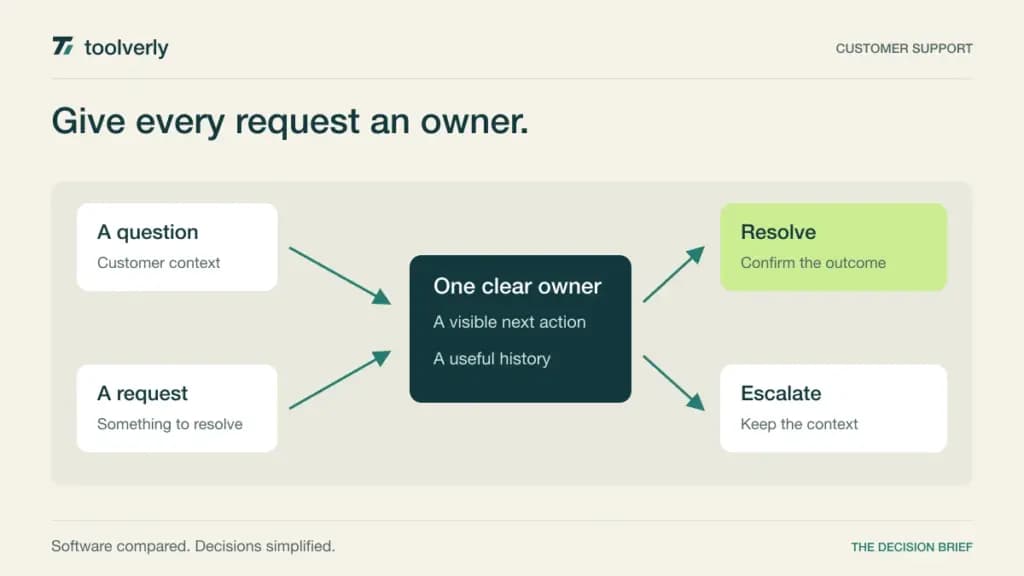
A support inbox becomes difficult before it becomes large. Two people reply to the same customer, a refund waits for another department, and nobody knows whether an unanswered message belongs to them. Help desk software should make ownership and the next action clear throughout the conversation.
We compare Help Scout, Freshdesk, Zendesk, Front, and Zoho Desk for customer support teams choosing their operating system for requests. Official sources were checked on September 23, 2026. Our recommendations interpret documented features and commercial terms; they are not based on an invented response-time benchmark or a claimed production deployment.
Choose the service model first
Identify the channels that actually need support and the people who must participate. An email team with occasional internal consultation needs something different from a multilingual service desk with phone queues and specialist routing. Write down the handoff that fails most often, then make that the center of your evaluation.
| Product | Best fit | Main strength | Tradeoff to examine |
|---|---|---|---|
| Help Scout | Teams growing from a shared inbox | Inboxes, knowledge bases, and progressive workflows | Routing and governance depend on plan |
| Freshdesk | Structured email support operations | Ticketing, portals, reporting, and escalation controls | AI and other usage can add to seat costs |
| Zendesk | Support spanning multiple channels | Separate entry support and broader Suite options | The lowest price does not include the full Suite |
| Front | Collaborative customer communication | Shared inboxes with ticketing and automation | Channel breadth and rule limits affect plan choice |
| Zoho Desk | Teams building a configurable service process | Tiered workflow, customer context, and self-service | Check regional pricing and exact edition boundaries |
Help Scout
Help Scout offers a free starting configuration with five users, one Inbox, and one Docs site. Standard expands to multiple inboxes and knowledge bases, basic workflows, and a basic service-level policy. Plus adds features such as advanced workflows, round-robin routing, and internal teams. Those steps make it possible to evaluate a simple queue before designing a larger operation.
Our fit judgment favors Help Scout when the team wants a clear shared-support process with room to add structure. Start by choosing who owns a conversation and when it should move to another person. A new platform will not resolve ambiguous responsibility on its own.
Paid tiers are priced per user, and AI Answers is separately listed at $0.75 per resolution, with trial and prepaid conditions. Confirm the selected billing term and what qualifies as a resolution. The tradeoff is plan depth: compare the required routing, service-level rules, and administrative controls before choosing a tier. A useful pilot includes a conversation that needs both a support reply and an internal decision.
Freshdesk
Freshdesk’s Growth plan brings ticketing and a shared inbox together with a customer portal, knowledge base, reporting, and roles. Pro adds capabilities including a multilingual help desk, custom reporting, intelligent routing, and multiple service-level policies. Enterprise adds further controls such as a sandbox and audit logs.
The annual pricing shown is $19 per agent per month for Growth, $55 for Pro, and $89 for Enterprise. Additional AI Agent sessions and other usage are listed separately; Freddy AI Copilot is an add-on for the higher plans shown. Do not assume the subscription includes unlimited automated service just because AI appears on the plan card.
Our recommendation is to shortlist Freshdesk for a team formalizing an email-support process with an explicit portal and escalation model. The tradeoff is deciding which workflows need advanced routing rather than a simple assignment rule. Use a sample of real, anonymized request types and check whether the correct owner can explain why each ticket arrived in their queue.
Zendesk
Zendesk makes an important distinction between Support Team and Suite Team. Support Team lists email ticketing, routing, dashboards, predefined replies, and automation at $19 per agent per month paid yearly. Suite Team is $55 on the same annual basis and adds a knowledge base, messaging and live chat, telephony, and omnichannel routing.
That distinction prevents a common comparison error: treating the lowest advertised price as the price of the full service platform. Suite Professional adds more operational capabilities, while enterprise packaging is handled through sales. Map your required channels and administrative needs to the actual edition before requesting a quote.
Our assessment is that Zendesk belongs on the shortlist when multiple channels and specialist handling are central to the service model. The tradeoff is implementation scope. A broad platform benefits from someone maintaining routing rules, categories, and reporting definitions. During evaluation, follow a customer who changes channels mid-request and ask the team to reconstruct the history without relying on the original agent’s memory.
Front
Front combines shared inboxes with ticketing and team collaboration. Its annual Starter plan is $25 per seat per month for up to ten seats and is positioned for single-channel support. It includes basic analytics, a public knowledge base, and up to ten automation rules. Professional is $65 per seat per month for up to 50 seats, adding omnichannel support, more rules, and advanced analytics.
Our fit judgment favors Front when answering a customer often requires cooperation across several people. The buying question is whether the team can keep internal discussion, ownership, and the external reply understandable as responsibility changes.
The tradeoff is that collaboration needs can outgrow the entry plan’s channel, seat, or automation limits. Additional AI capabilities also have their own packaging. Estimate the tier for the whole participating group, not just frontline agents. In a trial, include a conversation involving support, operations, and an account owner. Check who can act, who only needs context, and how the final reply avoids exposing an internal discussion.
Zoho Desk
Zoho Desk offers a sequence of editions with different workflow and self-service capabilities. The current Express description includes email support, web forms, direct assignment, workflows, and customer contacts. Standard adds features such as a knowledge base, community forum, customer ratings, and custom reporting. Higher editions provide further process controls.
Our recommendation is to evaluate Zoho Desk when the business wants to configure a service process around its customer records and working rules. Begin with a small vocabulary of categories and outcomes. More fields only help if agents can fill them consistently and managers use the result.
The pricing page supports multiple currencies and presented regional rates during our review. Confirm your local edition, currency, tax treatment, and annual or monthly commitment rather than borrowing a dollar figure from an older article. The tradeoff is edition mapping: verify every required channel and workflow against the selected plan. A pilot should demonstrate the customer context an agent needs at the moment of reply, without requiring several unrelated searches.
Evaluate the difficult handoffs
Build a short test queue containing a simple question, a repeated complaint, a request needing a refund decision, and an issue that crosses departments. Include one message arriving outside business hours. Ask prospective users to handle the queue without a live narrator explaining each step. The confusion you observe is a useful implementation requirement.
Define what a service-level target measures. A first reply, a substantive answer, and a final resolution are different events. Agree on how waiting for the customer affects the process. Then inspect whether a manager can understand overdue work and intervene without changing the historical record of what happened.
A help desk also depends on useful written answers. Our team wiki comparison covers internal knowledge maintenance, which is a separate decision from publishing a customer help center. For account context and sales handoffs, see the small business CRM comparison. Decide which system owns each type of information.
Calculate the operating cost
Count full agents, occasional contributors, managers, and administrators separately. Ask how each role is licensed. Add the required channels, AI usage, messaging, phone usage, and implementation support. A seat-only estimate can look attractive while excluding the feature that motivated the purchase.
For automation, start with one repeatable request and an explicit human fallback. Define success as the customer receiving an appropriate outcome, not merely an automated message being sent. Review a sample of completed conversations for incorrect closures and unclear handoffs before extending the workflow.
- Verify assignment, reassignment, internal notes, and the customer-visible reply.
- Check the required channels and languages on the proposed tier.
- Confirm reporting definitions and exportable conversation history.
- Model ordinary and peak usage, including separately priced AI actions.
- Assign an owner for templates, knowledge articles, and routing changes.
Choose Help Scout for a shared-inbox starting point, Freshdesk for a structured ticketing process, Zendesk for broader channel operations, Front for collaborative customer communication, and Zoho Desk for configurable service workflows. Trial the two closest fits using the same difficult handoffs before comparing annual contracts.
Official sources
Checked September 23, 2026: Help Scout plans, Freshdesk plans, Zendesk support and Suite pricing, Front plans, and Zoho Desk editions. Dollar figures are USD as displayed. Annual monthly equivalents require annual billing; check current taxes, usage charges, and contract terms.
Original illustration by Toolverly. Read about our publication or send a correction.