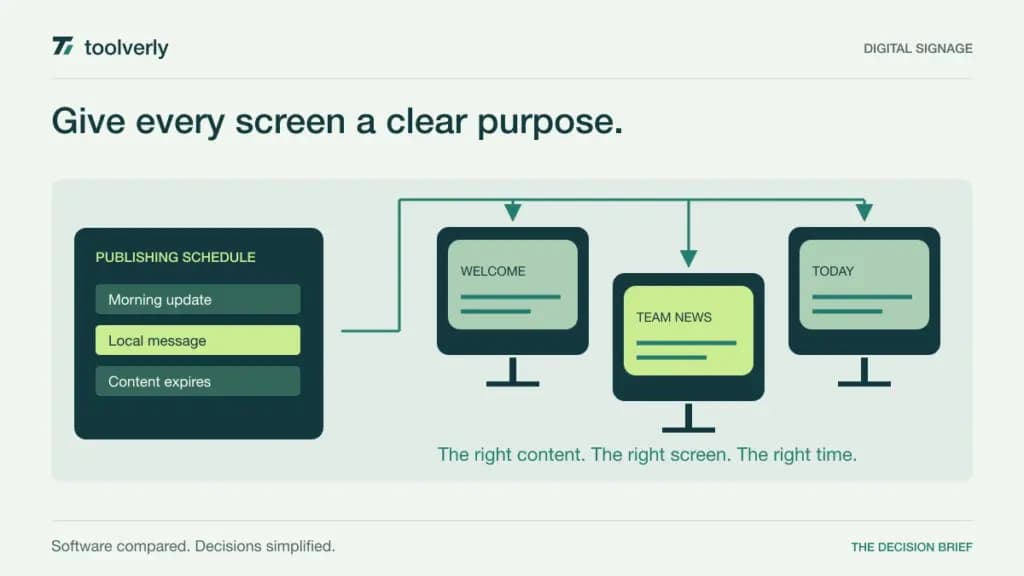
A digital screen is easy to buy and surprisingly easy to neglect. The harder purchase is the software that decides what appears, where it appears, who can change it, and what happens when the connection fails. A reception display, a staff dashboard, and a retail promotion wall can require different permissions and playback behavior.
This comparison covers ScreenCloud, Yodeck, OptiSigns, Rise Vision, and Screenly for business digital signage. Start with the content operation and the existing screens. An inexpensive software license is less attractive if every site needs a new player or someone must visit each location to recover a frozen display.
Research checked September 29, 2026. This is a comparison of official pricing and documented capabilities, not a hands-on playback or uptime test. Prices retain the reviewed currency and billing period. Hardware, installation, taxes, premium integrations, and volume conditions may add to the software subscription.
Compare the screen fleet and publishing workflow
| Product | Useful shortlist fit | Reviewed price reference | Check before ordering |
|---|---|---|---|
| ScreenCloud | Employee communication and connected screens | Core $20/screen/month, billed annually | Dashboard and governance features by tier |
| Yodeck | Scheduled playlists across a growing fleet | Basic €8/screen/month, billed annually | Player offer and all-screen billing beyond the free plan |
| OptiSigns | Signage that may grow into interactive use | Standard $10/screen/month on monthly billing | Advanced integrations and interaction features by plan |
| Rise Vision | Business displays with a defined escalation path | Business Basic $132/display/year | Industry selection, hardware, and higher-tier controls |
| Screenly | A centrally managed business screen fleet | Business $24/screen/month, billed annually | Five-screen minimum for Business |
ScreenCloud
ScreenCloud is worth considering when the screens are part of internal communication rather than an isolated playlist. Core includes apps, templates, file storage, and screen management. Pro adds capabilities such as dashboards, premium integrations, proof-of-play reporting, custom roles, and audit records.
Pricing: the annual USD offer lists Core at $20 per screen per month and Pro at $30. Enterprise is quoted. The page presents a player offer with annual plans, alongside a no-player discount choice; confirm the hardware eligibility and order conditions for the actual deployment.
Strength: the plan structure makes it possible to discuss both content creation and the management of a larger publishing operation. Limitation: a dashboard-heavy use case may need Pro even if the number of screens is small. An attractive Core price should not be used to budget features from another tier.
Best fit: organizations that want a repeatable communication channel across workplaces. Evaluate a routine update, a time-sensitive announcement, and an expired message. Check that staff can remove obsolete content just as easily as publishing something new. ScreenCloud plans and annual pricing.
Yodeck
Yodeck is a useful candidate for businesses that need scheduled playlists and want a clear route from one display to several locations. Basic includes layout and scheduling tools. Premium adds further integrations and media capabilities, while Enterprise extends controls such as roles, workspaces, and single sign-on.
Pricing: the reviewed European annual offer shows Basic at €8 per screen per month, Premium at €11, and Enterprise at €15. A one-screen free plan is available, but moving beyond one screen means paying for all screens, rather than retaining a free first screen indefinitely.
Strength: annual subscriptions include a specified player offer, making it possible to compare software and eligible hardware together. Limitation: the included player specification varies by tier, and integrations or administration requirements may move the deployment above Basic.
Best fit: a small fleet with a predictable publishing schedule and a responsible person at each location. Trial a daypart change, a special opening-hours message, and a screen returning after a network interruption. Confirm which content can continue locally and which items depend on a live service. Yodeck pricing and free-plan conditions.
OptiSigns
OptiSigns offers a progression from conventional signage into more connected and interactive displays. Standard includes playlists, scheduling, templates, split zones, storage, and multiple users. Pro Plus adds capabilities including secured websites, dashboard integrations, roles, approval workflows, audits, and proof-of-play information.
Pricing: on monthly billing, Standard lists $10 per screen, Pro Plus $15, and Engage $30. Enterprise lists $45 per screen with a 25-screen minimum. Annual billing advertises a discount; the table here uses the monthly offer so that the commitment is explicit.
Strength: the product range can accommodate both a passive information screen and a more interactive experience. Limitation: interaction, advanced integrations, and enterprise requirements are not interchangeable with the Standard subscription. Scope the feature before comparing the per-screen number.
Best fit: teams that may evolve from scheduled content to kiosks or audience interaction. Start with the actual device, orientation, and input method. Have someone unfamiliar with the content complete the intended task, then check how administrators restore the default display and review what was published. OptiSigns pricing and tier differences.
Rise Vision
Rise Vision should be evaluated using the correct industry selection. Its pricing page presents education and business offers, and the figures are different. For Business, Government & Other, Basic includes templates, scheduling, playlists, unlimited users and content storage, and offline playback.
Pricing: with the business selection and yearly billing, Basic shows $132 per display per year, Advanced $156, and Enterprise $180. Hardware is a separate purchasing decision. These figures should not be substituted with the lower education prices that may appear in the page’s default view.
Strength: the business tiers provide a clear route from routine signage to broader controls. Advanced includes features such as calendar integrations and company-wide scheduling overrides; Enterprise adds capabilities including approval workflows, dashboards, and SAML single sign-on. Limitation: the complete requirement may land above Basic even for a modest fleet.
Best fit: organizations that need to define who can override normal programming and how changes travel across sites. Demonstrate that workflow with ordinary and urgent messages. Treat any emergency communication role as a deployment requirement to validate, rather than an assurance created by buying a plan. Rise Vision pricing by industry.
Screenly
Screenly is a candidate for businesses organizing a screen fleet around central scheduling and controlled access. Its documented features include playlists, dayparting, cached offline playback, and an API. The plan choice affects both display capabilities and the people permitted to manage them.
Pricing: annual billing lists Starter at $15 per screen per month for one to five screens, with two users and 1080p output. Business is $24 per screen per month, requires at least five screens, and adds unlimited users, 4K, and custom permissions. Enterprise starts at a larger screen minimum and adds further administration features.
Strength: explicit user and display allowances make a focused fleet comparison possible. Limitation: a business needing a Business-only capability should budget the five-screen minimum, even if the initial installation is smaller. Hardware compatibility and player costs still require confirmation.
Best fit: an organization with a designated person responsible for screen operation. Test schedule changes across local time zones, content expiry, and recovery after disconnection. Confirm the actual content type continues to play as expected; cached media and live information are different operational requirements. Screenly pricing and minimums.
Plan the operation behind the display
Build a screen inventory before requesting quotes. Record location, orientation, resolution, operating hours, network access, player model, and the person who can physically reach each installation. Price the complete fleet, including test devices and likely replacements. A software-only comparison does not capture mounting, connectivity, shipping, or local assistance.
Next, define a publishing role and an approval role. A regional manager may need to change local opening hours without replacing a national campaign. Set an expiry date on temporary content and assign responsibility for reviewing what remains on screen. Our digital asset management comparison covers the upstream library of approved images and campaign files.
Use a short acceptance trial with real content. Publish a scheduled message, revise it, disconnect the network, restore connectivity, and remove the message. Observe the actual display rather than relying entirely on a dashboard status indicator. Test readability from the audience’s normal distance and verify portrait layouts separately from landscape ones.
Reception screens also need a clear boundary between general information and personal visitor details. If the workflow involves welcoming named guests and notifying hosts, our visitor management guide covers that separate system. Choose signage software for reliable, governed display publishing, and judge the trial by how easily the team keeps the screens accurate over time.
Original illustration by Toolverly. Read about our publication or send a correction.