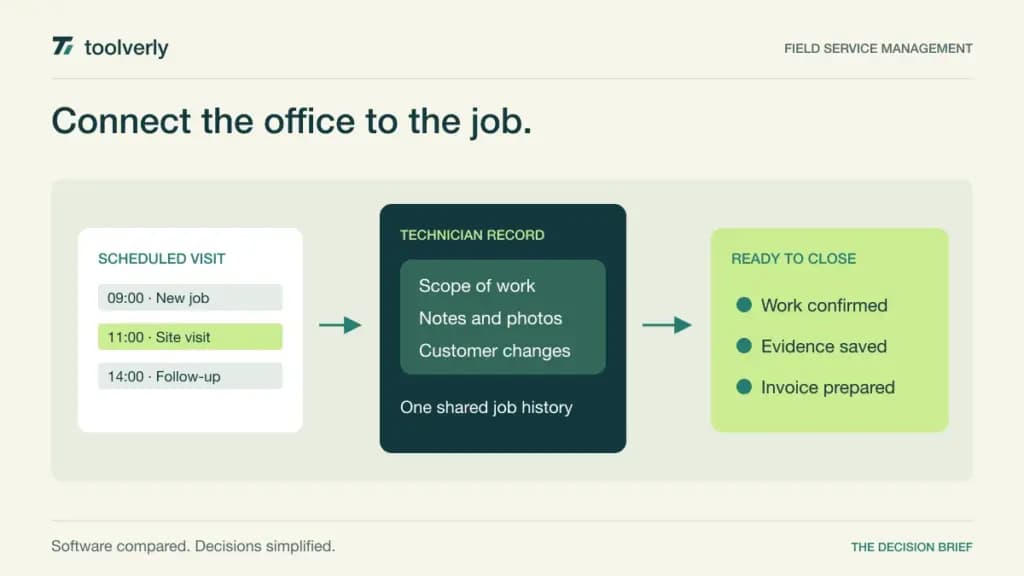
Field service work breaks down when the office schedule and the technician’s view of a job disagree. A customer has changed the access instructions, an estimate needs approval, or the completed work has not reached invoicing. Field service management software connects those handoffs so a service visit can become a complete business record.
Jobber, Housecall Pro, ServiceM8, Workiz, and ServiceTitan offer different ways to organize that process. The relevant decision is how your team books, dispatches, documents, and closes a job. A long feature list matters less than whether the office and field staff can complete the same workflow without rebuilding it in messages and spreadsheets.
Research checked October 1, 2026. This comparison uses current official pricing and product information, not hands-on field testing. USD examples below use the vendors’ stated plans and commitments. Confirm regional availability, payment charges, additional users, optional modules, and implementation costs before buying.
Five field service platforms compared
| Product | Best fit | Main strength | Price reference | Meaningful tradeoff |
|---|---|---|---|---|
| Jobber | Small service businesses organizing the full customer job | Booking, quotes, scheduling, and invoicing together | Core: US$29/month, billed annually, one user | User counts and workflow features vary by package |
| Housecall Pro | Service teams moving from basic administration to coordinated dispatch | Clear office-to-job scheduling workflow | Basic: US$59/month, annual billing, one user | Team and field-documentation needs can require Essentials |
| ServiceM8 | Small crews with a predictable number of monthly jobs | Job records with unlimited users on paid plans | Starter: US$29/month for 50 jobs | Job volume is a key capacity limit |
| Workiz | Dispatch operations needing configurable job workflows | Tiered automation and operational modules | Standard, Pro, and Ultimate require quotes | Phone and AI-related products can be separate purchases |
| ServiceTitan | Trade businesses planning a coordinated office and technician rollout | Dispatch, pricebook, and mobile job processes | Custom pricing per technician | Scope and implementation require detailed evaluation |
Jobber
Jobber brings booking, scheduling, quotations, invoices, and payments into one customer-service workflow. The current pricing page lists one-user Core at US$29 per month billed annually. The same entry option is US$39 per month with a one-year commitment paid monthly, or US$49 without that commitment. These are three different purchase conditions, not interchangeable monthly prices. Connect adds capabilities such as checklists, customer reminders, and QuickBooks Online integration.
Strength: Jobber gives a small operation a coherent starting point for moving a request through to an invoice. In a trial, take one realistic job with a revised quote and a customer who changes the appointment. Check whether the office can see the latest agreed scope without phoning the technician.
Limitation: the cheapest price describes one user and a particular commitment. A crew requiring several logins, reminders, or accounting synchronization needs a different configuration. Jobber fits businesses that want to formalize everyday service work; build the comparison around the package your actual roles need rather than assuming Core covers every handoff.
Housecall Pro
Housecall Pro’s Basic plan combines scheduling and dispatch, booking, estimates, invoicing, payments, and review management. Its official plan comparison lists Basic at US$59 per month with annual billing for one user. Essentials is US$149 per month on annual billing for up to five users, adding tools including checklists, photo annotations, routing, and QuickBooks integration. Temporary introductory promotions should not be treated as the ongoing subscription rate.
Strength: the move from a one-person service operation to a small dispatch team is visible in the packaging. A business can evaluate the same scenario with an office coordinator and technicians, then identify which shared records reduce repeated calls. Give field staff responsibility for showing how they would capture a changed scope.
Limitation: useful team and documentation capabilities sit above Basic. The total should also account for any optional services your operation needs. Housecall Pro is a sensible candidate when dispatch and customer communication are daily concerns. Evaluate a rescheduled visit and a return appointment, because a clean first booking rarely exposes the difficult parts of service administration.
ServiceM8
ServiceM8 organizes work around job cards, scheduling, customer history, quotations, and invoices. Its US pricing page offers a free plan with one user and 30 jobs per month. Starter is US$29 per month for 50 jobs and unlimited users; Growing is US$79 for 150 jobs and unlimited users. Higher tiers increase job capacity. The comparison also distinguishes included essentials from additional capabilities, so verify the specific forms, costing, and asset workflows you require.
Strength: a job-volume model can suit a crew that needs several people to access a modest number of service visits. It shifts the evaluation away from simply counting seats. Count a representative month’s jobs and include repeat visits, seasonal peaks, and how the vendor defines a job against the allowance.
Limitation: unlimited users do not remove capacity limits or make every advanced function part of Starter. Trial the exact phones and tablets your staff carry, including their normal connection conditions. ServiceM8 fits smaller service teams that can forecast workload and want a shared job record without budgeting every paid-plan login as a separate seat.
Workiz
Workiz now presents Standard, Pro, and Ultimate as quote-based packages on its pricing page. Standard covers jobs, scheduling, invoices, estimates, customer management, custom fields, and five automations. Pro adds more automation capacity, custom reporting, and further scheduling capabilities. Ultimate extends into areas such as inventory, multi-day work, and purchase orders. Genius Phone, Answering, and Marketing are identified as separate purchases; do not assume those products are included in the base quote.
Strength: the progression gives an operation with specific dispatch rules a useful way to discuss configuration. Write down one automation in plain language, including what happens if a customer responds late or a technician becomes unavailable. Ask the demonstration team to show the exception as well as the successful path.
Limitation: comparing Workiz requires a scoped proposal, especially where communication products are part of the intended setup. Ask which users, modules, and automation allowances the recurring price covers. Workiz fits teams ready to define their operational rules and assign someone to maintain them after implementation.
ServiceTitan
ServiceTitan offers Starter, Essentials, and The Works with custom pricing per technician. Its package overview describes dispatching, scheduling, call booking, invoicing, pricebook management, mobile estimates, and field checklists. Treat the overview as a starting point for a written feature-to-package confirmation. A capability appearing on the overall page is not sufficient evidence that it belongs in every proposed subscription.
Strength: ServiceTitan merits evaluation when the office, dispatchers, and technicians need a coordinated operational system. Bring representatives from each role into the same demonstration. Ask them to follow a quoted job into scheduling, a changed on-site requirement, completion evidence, and invoicing without skipping between unrelated sample records.
Limitation: per-technician pricing alone does not describe the full implementation effort. Clarify migration, training, configuration, integrations, and ongoing administration. ServiceTitan fits buyers prepared to work through that scope. It is less useful to request a headline price before identifying the technician population and the processes the new system must replace.
Build the shortlist around a complete service visit
Start with one common job and one awkward job. The common job establishes whether daily work is easy to complete. The awkward one might involve unavailable parts, a technician substitution, an estimate revision, and a second visit. Both should leave the office with a clear status and enough evidence to answer the customer’s next question.
Separate customer booking from resource assignment. If your main problem is letting customers reserve time, review the narrower appointment scheduling comparison. Field service management becomes more relevant when the booking must carry a job scope, assigned technician, site information, and commercial follow-through.
Likewise, a working-hours roster is different from assigning a particular job to a qualified person. Our employee shift scheduling guide covers roster decisions. During a field-service evaluation, check how the chosen system handles an employee who is present but unavailable for the next dispatch.
- Use your real job categories, service areas, and staff roles.
- Check revised estimates and approval evidence before work begins.
- Have technicians record notes and photos on their everyday devices.
- Follow completed work through the accounting handoff.
- Price the required users, job volume, modules, and payment services.
- Assign responsibility for templates, permissions, and dispatch changes.
Jobber and Housecall Pro are useful starting points for small service operations; ServiceM8 makes job-volume economics especially visible. Workiz deserves attention for defined operational workflows, while ServiceTitan suits a carefully scoped cross-team rollout. Choose the system that leaves the fewest unresolved handoffs after a real service visit.
Original illustration by Toolverly. Read about our publication or send a correction.